
06 USB Audio & MIDI
Class-compliant USB audio and MIDI interface for the Workshop Computer. Maps 6 hardware channels to USB audio streams (Normal Mode), or switches to Alt Mode for 1V/Oct CV, Gate, and Clock MIDI routing. Configurable via the Web MIDI editor and saved directly to flash memory.
Panel
 Main CCKnob X CCKnob Y CCAudio Input 1 / USB 1Audio Input 2 / USB 2CV Input 1 / USB 3CV Input 2 / USB 4Pulse Input 1 / USB 5Pulse Input 2 / USB 6Audio Output 1 / USB 1Audio Output 2 / USB 2CV Output 1 / USB 3CV Output 2 / USB 4Pulse Output 1 / USB 5Pulse Output 2 / USB 6
Controls
Main CC
Transmits configurable MIDI CC (default CC1 Modulation) when MIDI is enabled
Knob X CC
Transmits configurable MIDI CC (default CC2 Breath) when MIDI is enabled
Knob Y CC
Transmits configurable MIDI CC (default CC3 Expressive) when MIDI is enabled
Alt Mode (MIDI + Audio): Enables CV, Gate, and Clock MIDI conversion on jacks 3–6 while keeping stereo audio on channels 1 & 2
Normal Mode (6-Channel Audio): Maps all 6 hardware jacks directly to 6 USB audio streaming channels in your DAW
Audio Only Mode: Disables USB MIDI processing to dedicate maximum USB bandwidth strictly to audio streams
Inputs & Outputs
Inputs
Outputs
Inputs
Audio Input 1 / USB 1
Hardware Audio Input 1 (Normal mode: USB Audio Stream Ch 1; Alt mode: Audio In L)
Audio Input 2 / USB 2
Hardware Audio Input 2 (Normal mode: USB Audio Stream Ch 2; Alt mode: Audio In R)
CV Input 1 / USB 3
Hardware CV Input 1 (Normal mode: USB Audio Stream Ch 3; Alt mode: 1V/Oct pitch CV input)
CV Input 2 / USB 4
Hardware CV Input 2 (Normal mode: USB Audio Stream Ch 4; Alt mode: CC modulation CV input)
Pulse Input 1 / USB 5
Hardware Pulse Input 1 (Normal mode: USB Audio Stream Ch 5; Alt mode: Note Gate input)
Pulse Input 2 / USB 6
Hardware Pulse Input 2 (Normal mode: USB Audio Stream Ch 6; Alt mode: Clock / Run gate input)
Outputs
Audio Output 1 / USB 1
Hardware Audio Output 1 (Normal mode: USB Audio Stream Ch 1; Alt mode: Audio Out L)
Audio Output 2 / USB 2
Hardware Audio Output 2 (Normal mode: USB Audio Stream Ch 2; Alt mode: Audio Out R)
CV Output 1 / USB 3
Hardware CV Output 1 (Normal mode: USB Audio Stream Ch 3; Alt mode: 1V/Oct pitch CV output)
CV Output 2 / USB 4
Hardware CV Output 2 (Normal mode: USB Audio Stream Ch 4; Alt mode: CC modulation CV output)
Pulse Output 1 / USB 5
Hardware Pulse Output 1 (Normal mode: USB Audio Stream Ch 5; Alt mode: Note Gate / Trigger output)
Pulse Output 2 / USB 6
Hardware Pulse Output 2 (Normal mode: USB Audio Stream Ch 6; Alt mode: Clock / Run output)
LEDs
USB Mounted
Lights solid when USB host mounts the device
Config Status / SysEx
Flashes when SysEx configuration updates are received; indicates USB ready state
Audio Out Activity
Lights on USB audio playback stream activity
Audio In Activity
Lights on USB audio capture stream activity
USB Ready
Lights when TinyUSB hardware stack is initialized and ready
48 kHz Indicator
Lights when operating at 48 kHz sample rate (off at 44.1 kHz)
README
USB Audio & MIDI Interface
Turns the Workshop Computer into a class-compliant multichannel USB audio interface and USB MIDI device with integrated CV/Gate support.
- 6-Channel USB Audio: Route up to 6 audio channels into and out of your DAW.
- USB MIDI to CV/Gate: Control modular gear with MIDI notes, clock, and CCs, or send CV into your DAW as MIDI.
- Web MIDI Editor: Configure routing, channel counts, and sample rates directly in your browser.
Operating Modes
Set Switch Z on the Workshop Computer panel to select the active mode:
| Switch Position | Mode Name | Description |
|---|---|---|
| Middle | Normal Mode (6-Channel Audio) | All 6 hardware jacks map directly to USB audio streaming channels 1–6 in your DAW. |
| Up | Alt Mode (MIDI + Audio) | Enables CV, Gate, and Clock MIDI conversion while maintaining stereo audio on USB channels 5 & 6. |
| Down | Audio Only Mode | Disables USB MIDI processing to dedicate maximum USB bandwidth strictly to audio streams. |
Alt Mode (Switch Up) Jack Mapping
When Switch Z is set UP, hardware jacks provide MIDI to CV/Gate integration:
Inputs
- Audio In 1 & 2: Stereo passthrough routed to USB audio channels 5 & 6.
- CV In 1: 1V/Oct pitch CV input (converts incoming CV to MIDI notes).
- CV In 2: CC modulation source (converts CV to CC values).
- Pulse In 1: Gate input associated with CV 1 pitch tracking.
- Pulse In 2: External clock or run gate input.
Outputs
- Audio Out 1 & 2: Stereo audio playback from USB channels 5 & 6.
- CV Out 1: 1V/Oct pitch CV output (converts incoming MIDI notes to 1V/Oct).
- CV Out 2: CC modulation CV output.
- Pulse Out 1: Gate / trigger output (fires on MIDI note events).
- Pulse Out 2: Clock / run gate output.
Controls & MIDI CC
When MIDI functionality is active (Middle or Up mode), physical knobs send MIDI CC messages:
- Main Knob: Transmits MIDI CC 1 (Modulation).
- Knob X: Transmits MIDI CC 2 (Breath / Expressive).
- Knob Y: Transmits MIDI CC 3 (Undefined / Custom).
Web Configuration & Settings
Configure sample rates, channel masks, and custom CC/Gate routing using the USB Audio Web Editor. Settings save directly to the device's onboard flash memory.
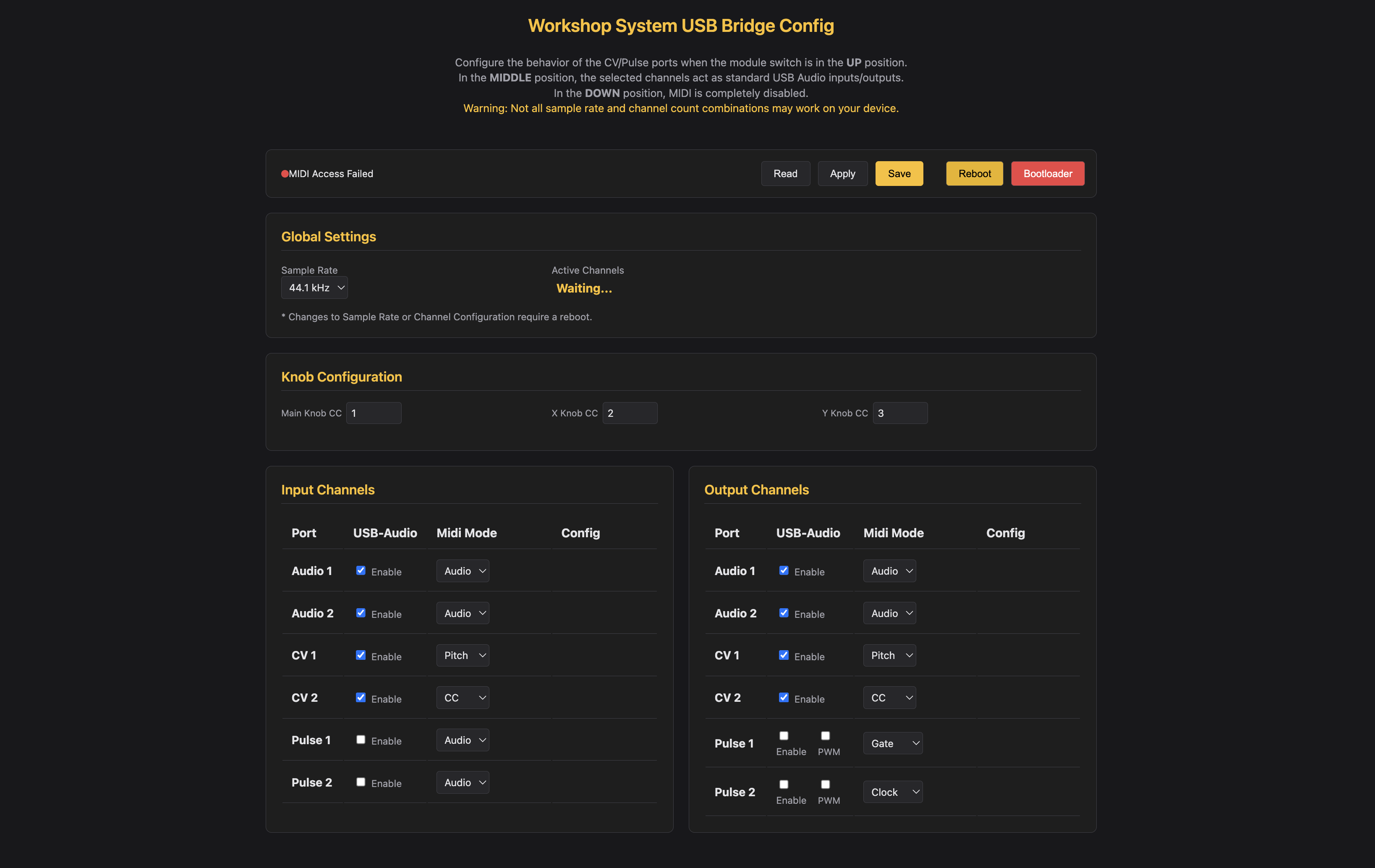
Default Factory Settings
- Sample Rate: 44.1 kHz
- Active Channels: 4 Channels (Audio 1/2 + CV 1/2) enabled for both Input and Output.
- Input Mapping: Audio 1/2 (Audio Stream), CV 1 (Pitch Ch 1), CV 2 (CC 4 Ch 1), Pulse 1 (Gate).
- Output Mapping: Audio 1/2 (Audio Stream), CV 1 (Pitch Ch 1), CV 2 (CC 4 Ch 1), Pulse 1 (Gate), Pulse 2 (Clock).
[!NOTE] OS & USB Bandwidth Guidance
The RP2040 USB interface operates at Full Speed (USB 1.1). Bandwidth varies by host OS:
- macOS: Up to 6 Channels @ 48 kHz.
- Windows: Recommended 4 Channels @ 44.1 kHz or 6 Channels @ 24 kHz for optimal stability.
- Linux: 2 Channels up to 48 kHz; 4 Channels up to 24 kHz.
Firmware Flashing
- Hold the BOOTSEL button on your Pico / Workshop Computer board while plugging in the USB cable.
- Drag and drop
usb_audio_midi_interface.uf2onto the mountedRPI-RP2drive.
Building from Source (Developer Info)
[!IMPORTANT] TinyUSB Library Update Required
When building from source using the Pico SDK, ensure the embedded
tinyusblibrary is updated to avoid USB audio class stability bugs:cd $PICO_SDK_PATH/lib/tinyusb git checkout master git pull
Build Steps
mkdir build
cd build
cmake ..
make
Created for the Music Thing Modular Workshop System by Vincent Maurer with assistance from Google Gemini. Special thanks to Chris Johnson for the initial USB-Audio base and the ComputerCard library.