
110 Impermanence
Record 0.75 seconds of stereo audio, then play it with a single Chaos knob. Every movement re-cuts the loop: more slices, reordered, reversed and pitch-scattered as Chaos rises. A still knob holds the loop exactly; a moved knob throws it away for good, with no undo and no presets. Three layers of different lengths phase against each other into a shimmer reverb whose tail rises in octaves and animates as its decay knob opens. Tap the switch down for Rhythm mode, where slices step to a clock on Pulse In 2.
Panel
 ChaosReverb DecayReverb Wet/DryRecord In LRecord In RChaos CVWet/Dry CVRecordClockOut LOut RWanderEnvelopeLayer 1 CycleLayer 3 Cycle
Controls
Chaos
Position sets how wild a re-cut can be; movement triggers a new one
Reverb Decay
Reverb Wet/Dry
Levels: Main / X / Y set the levels of layers 1 / 2 / 3; Chaos and reverb hold their last values (the reverb keeps sounding)
Perform: Main = Chaos, X = reverb decay, Y = reverb wet/dry. Main fully anticlockwise clears the buffer; turning it back up records a new take
Perform: Same knob jobs as middle (Down is momentary)
Texture / Rhythm: Tap down to toggle between free-running grains (Texture) and clocked percussive slices (Rhythm)
Inputs & Outputs
Inputs
Outputs
Inputs
Record In L
Left record source (both sides when Audio In 2 is unpatched)
Record In R
Right record source
Chaos CV
Adds to Chaos in Texture mode (moving it re-cuts the loop); ignored in Rhythm mode and with the switch up
Wet/Dry CV
Adds to reverb wet/dry, in every switch position
Record
Starts a 0.75-second take; a second pulse during the take ends it early. Unplugging doesn't disturb the loop
Clock
Locks loop timing to the clock without changing pitch; in Rhythm mode each beat plays the next slot. Unplugged or stopped, the last tempo is held
Outputs
Out L
Left output, after the shimmer reverb
Out R
Right output, after the shimmer reverb
Wander
Slow, smooth random voltage, 0 to about +5V; patch to CV In 2 for self-fading reverb
Envelope
Envelope follower on the loop, before the reverb
Layer 1 Cycle
Pulse at the end of each layer 1 loop (the whole take)
Layer 3 Cycle
Pulse at the end of each layer 3 loop (the 2/3-length layer); 3 against 2 with Pulse Out 1
LEDs
Record / re-cut
On while recording; flashes on each re-cut
Rhythm mode
Layer 1 loop end
Mirrors Pulse Out 1
Layer 3 loop end
Mirrors Pulse Out 2
Wander level
Blinks with LED 5 while a knob is catching up
Envelope level
Blinks with LED 4 while a knob is catching up
README
Impermanence
A Workshop Computer program card: a 0.75-second stereo take, a Chaos knob that re-slices it every time it moves, and a shimmer reverb. No undo, no presets. A still knob holds the loop; moving it throws that loop away for good.
Status: 0.4.2. Every release has been flashed and played on a real Workshop Computer, alongside the host tests and the cycle benchmark.
- 0.3.0 — clear the take with Main fully anticlockwise and record by turning it back up; Pulse Ins that survive unplugging; reverb that keeps sounding with the switch Up; longer grain fades; whole-octave pitch scatter (±2 octaves) and whole-playhead reverse; a 0.75-second 16-bit take in place of the packed 12-bit second.
- 0.4.0 — a rebuilt shimmer: a real octave-up bloom, and a tank sweep that opens up with the decay knob.
- 0.4.1 — end-of-cycle pulses from L1 and L3.
- 0.4.2 — a clock follows the tempo without moving the pitch.
It vendors ComputerCard v0.3.0. Upstream is now v0.4.0, which changes knob scaling among other things, so that upgrade is a job of its own.
Quick start
- Patch audio into Audio In 1 (and In 2 for stereo).
- Send a pulse to Pulse In 1, or turn Main fully anticlockwise and back up: the card records a 0.75-second take.
- With the switch in the middle, turn Main a little. The take is re-cut into new slices. Stop turning and the new loop repeats exactly.
- Turn Y up for reverb and X for a longer tail.
- Tap the switch Down for Rhythm mode (LED 1 on) and patch a clock into Pulse In 2.
Take, region, slice, slot
Four words, used throughout this README and in the code.
Take — one recording: the whole 0.75-second buffer (36,000 frames at 48kHz). There is only one, and recording always replaces it.
Region — the part of the take a layer loops. The three layers (three playheads) read the same take over different regions, all ending where the take ends:
| Layer | Region | Starts at | Length | Loop time |
|---|---|---|---|---|
| L1 | the whole take | 0 ms | 36,000 frames | 750 ms (80 bpm) |
| L2 | last 3/4 | 187.5 ms | 27,000 frames | 562.5 ms (106.7 bpm) |
| L3 | last 2/3 | 250 ms | 24,000 frames | 500 ms (120 bpm) |
The lengths are in the ratio 12 : 9 : 8, so the three only line up again every 4.5 seconds (6 L1 loops, 8 L2, 9 L3) — and because the regions start at different points, the same slice number means different audio in each layer. The two pulse outs carry L1 and L3 (see below).
Slice — a region cut into equal parts: 1, 2, 4, 8 or 16 of them, depending on Chaos. In Texture each layer divides its own region, so slices differ in length between layers (at 8 slices: 93.8ms in L1, 70.3ms in L2, 62.5ms in L3). At the lowest Chaos there is one slice per layer — the whole region — which is why a calm knob just plays the loop. (In Rhythm mode all three layers share one slice length instead: the take divided by 4, 8 or 16.)
Slot — one step of a layer's cycle. A re-cut writes a slice map: for every slot, which slice to start from, forwards or backwards, which octave, and a small offset. The layer plays its slots in order, then repeats. Each slot is sounded by a grain: a voice with a fade in and out, two of which overlap while one slot crossfades into the next.
A slice is a starting point, not a boundary
How long a slot lasts is set separately — by the slice length in Texture, or by the clock in Rhythm — while the playhead reads at whatever rate its octave says, wrapping round at the end of the take. So:
- at 1× it reads exactly that slice;
- at 2× or 4× it runs past the slice end into whatever follows, covering two or four slices' worth of audio in the same time;
- at ½× or ¼× it only gets through half or a quarter of the slice;
- reversed, it starts at the slice's end and runs backwards out of it;
- jitter shifts the start by up to about ±¼ of a slice at full Chaos.
Slices quantise where playback begins; pitch, direction and jitter decide what you actually hear.
Worked example. L2, 8 slices, playing slot 3:
- Region: frames 9,000 → 36,000 (the last 3/4 of the take)
- Slice length: 27,000 / 8 = 3,375 frames (70.3 ms)
- The map says slot 3 plays slice 6, reversed, one octave down
- Start: 9,000 + 6 × 3,375 = frame 29,250; reversed, so it begins at the slice's end (32,625) and runs backwards
- The slot lasts 70.3 ms, but at half speed it covers only 1,687 frames — so you hear the second half of slice 6, backwards
What the pulse outs do
Pulse Out 1 fires at the end of L1's loop, Pulse Out 2 at the end of L3's, and LEDs 2 and 3 mirror them. L2 has no jack.
In Texture the two are fixed by the region lengths: 750ms against 500ms — a 3-against-2. Every second L1 pulse lands exactly with every third L3 pulse, once every 1.5 seconds.
In Rhythm all three layers share a slice length and differ in slot count, so the meter changes with Chaos. Loop times below are for the internal clock; with a clock on Pulse In 2 they scale with its tempo, and the ratios hold.
| Chaos | Slice | L1 | L3 | Loop times | Meter |
|---|---|---|---|---|---|
| lowest | 187.5 ms | 4 slots | 3 slots | 750 / 562.5 ms | 4 against 3 |
| middle | 93.8 ms | 8 slots | 5 slots | 750 / 468.8 ms | 8 against 5 |
| highest | 46.9 ms | 16 slots | 11 slots | 750 / 515.6 ms | 16 against 11 |
L1 always lands on 750ms — a whole take — whichever slice size is in use.
These jacks used to carry L2 and L3, whose loops are only 9:8 apart. That pair drifts slowly past each other and spends long stretches nearly-but-not -quite together, which reads as flams rather than a rhythm, and in Rhythm at the lowest Chaos they share a slot count and fire together outright. L1 against L3 coincides more often but always exactly, on a musical cycle.
Controls
| Switch | Main | X | Y |
|---|---|---|---|
| Middle | Chaos | Reverb decay | Reverb wet/dry |
| Up | Level, L1 | Level, L2 | Level, L3 |
| Tap Down | Toggles Texture ↔ Rhythm | ||
| Middle, Main fully anticlockwise | Clears the take; turning back up records a new one |
- Chaos sets how far each re-cut can go: from one in-order slice per layer (the plain loop) up to 16 slices, with slots reordered and pitch-scattered in whole octaves (first +1, then ±1, then ±2). A slot can play its slice backwards, and a whole layer can run backwards too. The knob's position sets how wild; its movement is what triggers a new cut.
- Clear and record: with the switch in the middle, turning Main all the way down fades the loop out (~5ms), clears the take, and forgets any held clock tempo. Turning it back up past the bottom of its travel starts a new take straight away, and the loop fades back in as it records.
- Clicks: every grain fades in and out over at least 4ms, and each take's first and last 4ms are faded, so the loop point is smooth too.
- Catch-up: after switching between Up and Middle, each knob does nothing until it passes the value it was last set to on that page. LEDs 4 and 5 blink alternately until all three knobs have caught up.
- Down is spring-loaded, so it can't hold a mode. A tap flips the mode, and the mode stays after the switch springs back.
Jacks
| Jack | |
|---|---|
| Audio In 1/2 | Record source. With nothing in In 2, In 1 records to both sides. |
| Pulse In 1 | Start a 0.75-second take. A second pulse during the take ends it early (50ms minimum). Pulling the cable out doesn't disturb the loop. |
| Pulse In 2 | Clock. L1's loop stretches or squeezes to span a power-of-two number of clock periods — timing only, the pitch doesn't move. In Rhythm mode each beat plays the next slot. Unplug it, or stop the clock, and the card keeps going at the last tempo until a new clock arrives or you clear the take. |
| CV In 1 | Adds to Chaos, Texture mode only. Moving it re-cuts the loop, just like the knob. |
| CV In 2 | Adds to reverb wet/dry, in every switch position. |
| Audio Out 1/2 | Stereo out, after the reverb. |
| Pulse Out 1/2 | End of L1's / L3's loop (3 against 2 in Texture). |
| CV Out 1 | Slow wandering random voltage, 0 to about +5V. Patch it to CV In 2 for self-fading reverb. |
| CV Out 2 | Envelope follower on the loop (before the reverb). |
LEDs
| Left | Right | |
|---|---|---|
| Top | 0: recording / flash on each re-cut | 1: Rhythm mode |
| Middle | 2: L1 loop end (Pulse Out 1) | 3: L3 loop end (Pulse Out 2) |
| Bottom | 4: CV Out 1 level | 5: CV Out 2 level |
LEDs 4/5 blink alternately while a knob is waiting to catch up.
How it works
Three layers. Three playheads over one take, each looping its own region (see above). Their default levels are 0.85 / 0.58 / 0.39, so the shorter layers sit under the main one, and L2 plays with its channels swapped for width. All three share one slot clock, so they keep their 1 : 3/4 : 2/3 relationship at any tempo.
Clocking doesn't change the pitch. A clock on Pulse In 2 sets how quickly the card works through its slots; the playheads still read the audio at their own rate. So the loop follows the tempo while everything stays at the pitch it was recorded at, and the octave scatter stays in tune with it.
What gives is the material, not the pitch: run faster than the take and each slot is cut short before it reaches the end of its slice; run slower and slots overrun into what follows, or repeat. That's the usual sound of a sliced loop chasing a clock, and in Rhythm — where each beat fires a short hit anyway — it's simply hits landing on the beat, at pitch.
(The card used to play faster or slower like tape, pitch and all. To get
that back, set readRate to slotSpeed in Control::Publish — one line.)
Texture mode. Each layer free-runs through its slots as overlapping grains, each slot lasting one slice length. At low Chaos the slices are in order and the crossfades line up exactly, so you hear the plain loop; higher Chaos means more slices, longer overlaps, more reordering and wider pitch scatter.
Rhythm mode. Each clock beat plays the next slot as a short percussive hit. Here all layers share one slice length (the take divided by 4, 8 or 16) and differ in how many slots they cycle through — 4/3/3, 8/6/5 or 16/12/11 — which is what interlocks them. With 16 slices but 11 slots, L3 plays 11 starts drawn from the 16 available slices. Beats only advance through the current slice map, never re-cut it. Without a clock, an internal one runs at 4, 8 or 16 steps per take.
Recording. There is only room for one take, so a new one overwrites the old while it plays. You hear the old loop dissolve into the new one.
Impermanence. Every re-cut draws from a random generator seeded from hardware noise at power-on, and it never rewinds. Turning the knob back to where it was makes a new cut, not the old one.
Shimmer. A plate reverb (the Dattorro tank used by Reverb+, shortened to fit in RAM) whose tail is pitched up an octave and fed back in, so each pass round the loop adds a layer an octave higher.
The X knob does two things: it sets the decay, and it opens up a slow sweep of the tank (Dattorro's excursion, as Reverb+ does it) so long settings animate instead of hanging still. Measured on a steady tone, the wet level breathes by ±0.4% at the bottom of the knob and ±6.4% at the top.
Getting it to sound like a shimmer rather than a bright reverb took three
things, all measured (see docs/design-brief.md):
- A long crossfade window in the pitch shifter. A two-tap shifter
recycles each head once per window, heard as ripple at (rate / window).
The first version's 1024-tick window put that at 23Hz — a buzz. At 4096
it's 5.9Hz. The Barber's Pole card's
octave.hdocuments the same finding from its own measurements. - A DC blocker on the shimmer return. The shifter passes DC, so any offset recirculated and grew; that was what forced the return down to 0.2 and kept the octave 22dB below the fundamental. Blocked, the return sits at 0.5 and the octave comes up level with it.
- Flushing sub-LSB values to zero inside the tank. Integer rounding left a single unit circulating forever — a −1 DC offset still present a minute after the input stopped. Now every decay setting reaches true silence.
CV Out 1, the wandering voltage. Every 1 to 5 seconds it picks a new random level between 0 and about +5V, then glides towards it. The glide speed is fixed (two smoothing stages, ~0.7s each), so a long jump takes longer than a short one, and every move is an S-curve rather than a ramp. It usually arrives before the next level is chosen, but not always — being pulled somewhere new mid-glide is what stops it sounding like a sequence of steps. Patch it into CV In 2 for slow, hands-off reverb fades.
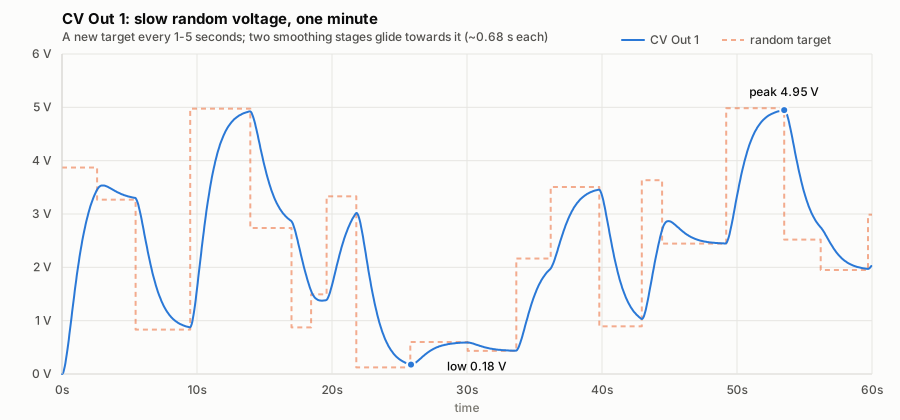
Over the minute above: low 0.18V, peak 4.95V, average 2.3V, and roughly a fifth of the time in each volt from 0 to 5. It reaches the extremes only when a distant target happens to be held for a while — the run down to 0.2V at 26s is three low targets in a row.
Timing and cores
ComputerCard calls ProcessSample() from its audio interrupt 48,000 times a
second. It must return, together with ComputerCard's own per-sample work,
within ~20.8µs. If it doesn't, the ADC/multiplexer/DAC sequence falls out of
step and everything garbles, which is what happened in 0.1.0 (measured
afterwards at 26–36µs per sample).
Pulse Ins and jack detection. The card uses ComputerCard's normalisation probe to tell when a jack is empty. It works by feeding a random bit pattern into every unpatched input. For up to ~11ms after a cable is pulled out, a Pulse In reads that pattern, which is a burst of fake edges. Before 0.3.0 those edges toggled recording (overwriting the loop) and scrambled the clock. Now each Pulse In edge waits 20ms and is dropped if the jack turns out to be empty:
- Recording listens to a 20ms-delayed copy of the input, so takes still start exactly on the trigger.
- The Rhythm clock is an internal beat locked to the confirmed edges' tempo and phase, so hits land on time (only the first beat of a new clock is late). It keeps running at the last tempo when the cable comes out.
The card follows the ComputerCard and Workshop directive guidance:
- Core 0 does audio only. Recording, the slice engine's voices, the reverb and the jacks. No divisions and no bursts of work on one sample.
- Core 1 does control-rate work. Knobs, catch-up, deciding when to re-cut, generating slice maps, all the division-heavy slot and grain maths, and the LEDs. It hands results to core 0 through a double-buffered parameter block with an acknowledge handshake, so core 0 never reads a half-written block. Core 0 wakes core 1 once per sample, which keeps its activity locked to the sample clock (unsynchronised activity can alias into the audio inputs as whine).
- Core 1 also precomputes each slot's start frame and rate, so starting a grain — once the most expensive thing the interrupt did — is a lookup and one multiply.
- Long work is split across samples. The reverb runs at 24kHz, half on even samples and half on odd. When all three layers start a grain at once, the starts are staggered 1/2/3 samples apart.
- A 0.75-second, 16-bit take. 0.1–0.2 packed a full second of 12-bit samples into the same 144KB. Unpacking cost ~85 cycles per sounding voice per sample, the biggest single cost when all six voices play. Plain 16-bit samples read in a couple of instructions.
- Memory layout. Small, hot state sits at the front of each object and the big buffers at the end, so the Cortex-M0+ can reach it with short loads.
- 192MHz at 1.15V. This is officially supported, and ComputerCard recommends it alongside 144MHz (a multiple of 48MHz, so it's alias-free). At 144MHz the worst sample used ~100% of the budget.
Measured with tools/bench/cycles.py (the compiled firmware on an emulated
Cortex-M0+, ~84,000 samples across Texture, Rhythm, re-cutting, recording, an
odd external clock, CV, and clear-and-record): typically ~2,800 of 4,000
cycles per sample (~75%), and 3,414 cycles (17.8µs, 85%) at worst. Rerun it
after any change to the audio path.
Building
Needs the Pico SDK 2.1.1 and the
official ARM GNU toolchain
(14.2.Rel1). Homebrew's arm-none-eabi-gcc has no libc and won't link.
export PICO_SDK_PATH=/path/to/pico-sdk
cmake -S . -B build -DCMAKE_BUILD_TYPE=Release
cmake --build build
This produces build/Impermanence.uf2. Hold BOOTSEL on the Computer while
connecting USB, then copy the file across. RAM use is printed on every build
(currently 218,540 B of 256KB: 144,000 B of take, 32KB of reverb delay
lines, 4KB of input delay, and the code itself, which is copied to RAM).
Testing
The instrument (everything in src/ except main.cpp) has no hardware
dependencies, so it also runs on a computer:
make -C test          # behaviour tests
make -C test render   # example WAVs in test/out/
The tests check:
- the take buffer stores samples exactly
- pot catch-up works
- a still knob repeats the loop sample-for-sample (Texture and Rhythm)
- turning the knob away and back does not restore the loop
- knob jitter and CV noise don't trigger a re-cut
- CV1 only acts in Texture mode
- switch flips never re-cut
- pulse-out timing is correct
- the shimmer reverb dies to silence at maximum decay
- outputs stay in range
- nothing breaks when core 1 runs late
- unplugging Pulse In 1 leaves the loop untouched (simulating the probe's fake edges)
- unplugging Pulse In 2 keeps the clocked tempo
- Main fully anticlockwise clears the take, and turning it up records
- a clock changes the timing but not the pitch
Hardware test plan
Each release has been played on the hardware; this is the checklist to work through before calling a version done, rather than a record of what has been run.
- Timing budget. Set
IMPERMANENCE_PROFILEto 1 insrc/main.cpp, rebuild, and play at high Chaos and high Y, in both modes, while turning Main. LED 5 latches on if any sample took more than 15µs (the emulator says ~11µs at worst). Also listen for clean audio with nothing patched and the knobs still. - Recording. Pulse In 1 records a clean 0.75-second take. Check In 1 alone records to both sides, and that a second pulse cuts a take short. Check that unplugging Pulse In 1 mid-loop leaves the loop playing.
- Catch-up. Flip Up ↔ Middle with the knobs far from their stored values: nothing should jump, and LEDs 4/5 should blink until caught.
- No clicks. Sweep Main slowly and quickly at every Chaos range, dry (Y down).
- Clear and record. Turn Main fully anticlockwise: the loop should fade out over a few ms, not cut. Turn it back up: a new take records (LED 0 on) and fades in as it goes.
- Rhythm. Tap Down, clock Pulse In 2 from slow to fast, and check the hits lock to the clock. Then unpatch it: the hits should carry on at the last tempo. Clearing the take (Main fully anticlockwise) drops back to the internal clock.
- Clocked pitch. Record something tonal, then clock Pulse In 2 at a tempo that stretches the loop. The timing should follow; the pitch should not move.
- CV. Check CV1 re-cuts in Texture but not Rhythm. Check CV Out 1 → CV In 2 gives slow wet/dry fades.
- Reverb. At maximum X and Y, feed loud material, then stop it. The tail must die away completely, and the sweep should be audible as the knob comes up.
- Impermanence. Find a loop you like, turn Main away and back: it should be gone.
Files
src/main.cpp              Hardware glue, clock, core 1 launch
src/Impermanence.h        Core 0 audio path + the core 0 <-> core 1 handoff
src/Control.h             Core 1: controls, catch-up, re-cuts, slice maps,
                          grain maths, CV Out 1 wander, LEDs
src/Params.h              What core 1 hands core 0 each update
src/SliceEngine.h         Core 0: layers, slots, grains, Texture/Rhythm
src/Shimmer.h             Half-rate plate reverb + octave-up feedback
src/EnvelopeFollower.h    CV Out 2 envelope follower
src/StereoBuffer.h        0.75-second 16-bit stereo take buffer
src/Hook.h                Pot catch-up
src/Random.h              xorshift32
LICENSE                   MIT
lib/ComputerCard.h        ComputerCard v0.3.0 (Chris Johnson, MIT)
test/                     Host tests and WAV renders
tools/bench/              Cycle counter: firmware on an emulated Cortex-M0+
docs/design-brief.md      The original brief and every decision since
docs/cv-out-1-wander.svg  A rendered minute of CV Out 1
Credits
- ComputerCard by Chris Johnson (MIT).
- Reverb tank topology after Jon Dattorro (1997), as used in the Reverb+ card.
- The firmware, tests and docs were written with Claude (an AI model) from
Matt Allison's design brief, following the Workshop Computer AI coding
directive. Design decisions are recorded in
docs/design-brief.md.