
114 Workshop Fetichist
Workshop Fetichist is a harsh, semi-random drum machine and noise processor for the Music Thing Modular Workshop Computer (hardware revision 1.1). Inspired by the Body Synths Metal Fetishist, it combines a looping random CV sequencer, probability-based trigger skipping, white noise, external audio processing, and two aggressive effects: Bitcrusher and Distortion. It can also be used as a random CV sequencer and rhythmic trigger source. The sequencer has an internal clock, but can be synchronized via Pulse In 1 or MIDI USB.
Panel
 Random / LoopCrossfade / Effect BlendSkip / TempoAudio In 1Audio In 2VCA CVCrossfade CVClock InDouble SpeedMain Audio OutNoise OutRandom CVAD EnvelopePlayed TriggerSkipped Trigger
Controls
Random / Loop
In Play, selects fresh random values or a fixed random loop from 2 to 32 steps. In Down, controls effects dry/wet.
Crossfade / Effect Blend
In Play, attenuates sequencer CV modulation of the audio/noise crossfader. In Down, blends Bitcrusher and Distortion.
Skip / Tempo
In Play, sets skipped-step probability from 0 to 95%. In Down, sets internal tempo from 20 to 300 BPM.
Stop: Stops the sequencer and clears the trigger outputs and envelope.
Play: Runs the sequencer. Main, X and Y control the sequencer and crossfader.
Effects / Tempo: Keeps the sequencer running while Main, X and Y adjust effect mix, effect blend and internal tempo.
Inputs & Outputs
Inputs
Outputs
Inputs
Audio In 1
First external audio input; summed with Audio In 2.
Audio In 2
Second external audio input; summed with Audio In 1. The internal white-noise generator remains active independently.
VCA CV
Controls the main output VCA. If unpatched, the VCA is fully open.
Crossfade CV
Overrides the internal sequencer CV and controls the crossfade between external audio and white noise.
Clock In
External clock input. Takes priority over the internal clock when USB MIDI Clock is not active.
Double Speed
A high gate doubles the sequencer step rate.
Outputs
Main Audio Out
Main signal output after the audio/noise crossfader, effects and VCA.
Noise Out
Independent white-noise output, before the crossfader, effects and VCA.
Random CV
Sequencer CV output, updated on every step, including skipped steps; 0–5 V.
AD Envelope
Exponential attack-decay envelope triggered by played steps; 0–5 V.
Played Trigger
5 ms trigger when a step is played.
Skipped Trigger
5 ms trigger when a step is skipped.
README
Workshop Fetichist
Workshop Fetichist turns the Music Thing Modular Workshop System into a harsh, semi-random drum machine and noise processor inspired by the Body Synths Metal Fetishist. It combines a looping random CV sequencer, probability-based trigger skipping, a white noise generator, external audio processing and two aggressive effects.
The sequencer can also be used on its own as a source of random control voltage and rhythmic gates.
- Firmware: v1.0.0
- Creator: ikkini
- Source code: github.com/ikkini1/workshop-fetichist
The firmware is designed for Workshop Computer hardware revision 1.1.
Quick start
- Set the Z switch to Middle (Play).
- Leave Pulse In 1 unpatched to use the internal clock.
- Turn Main fully counter-clockwise for a new random CV value on every step.
- Turn Y to introduce skipped steps. Played steps appear at Pulse Out 1; skipped steps appear at Pulse Out 2.
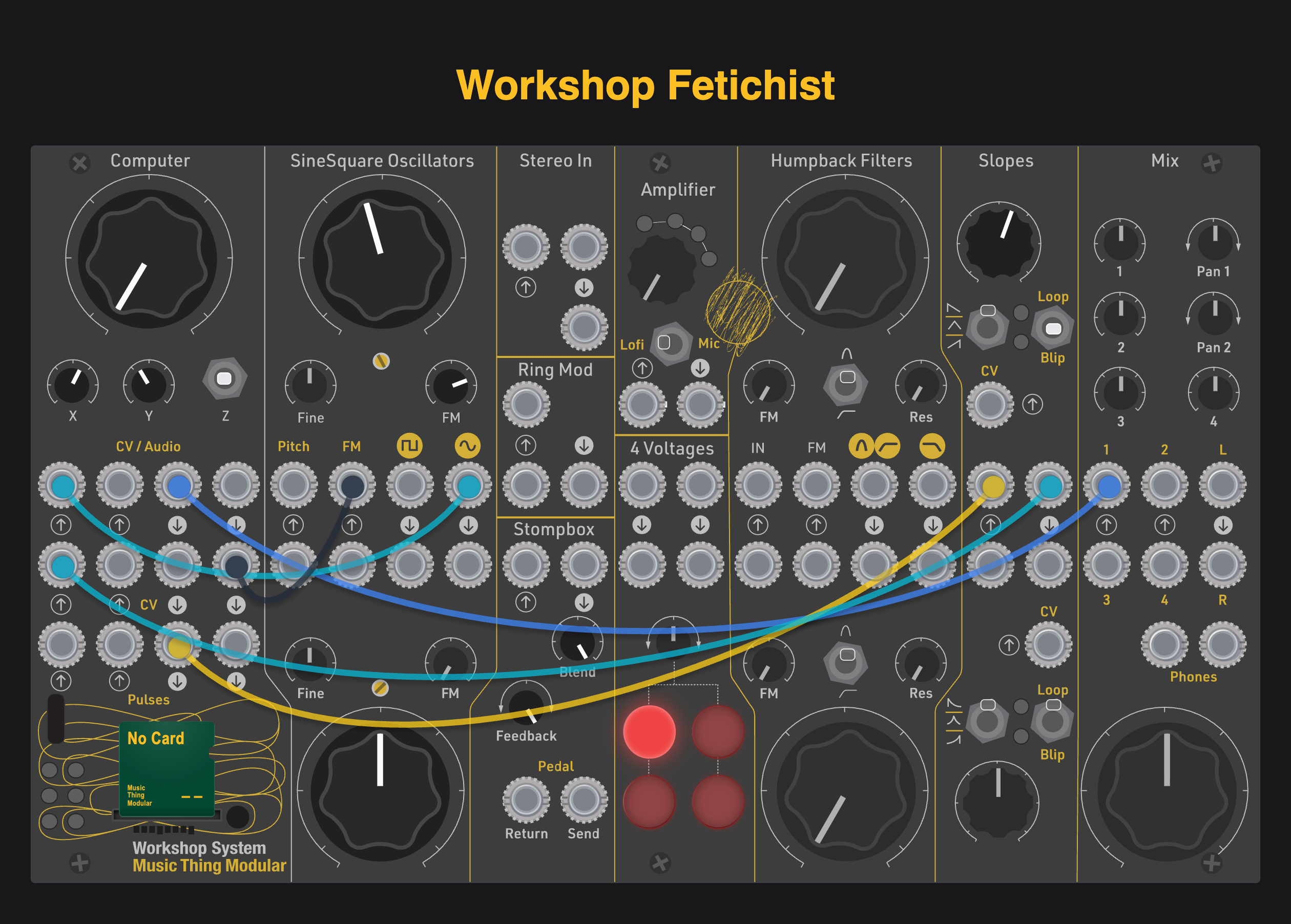
- Patch VCO1 Sine output to the Audio Input 1 of the Computer.
- Patch CV2 out to the FM input of VCO1.
- Patch Audio Out 1 to your mixer.
- Move Z to Down to adjust the effects and internal tempo while the sequencer keeps running.
Controls
Z switch
- Up — Stop: stops the sequencer, clears the trigger outputs and envelope.
- Middle — Play: runs the sequencer. Main controls random/loop behaviour, X controls the crossfader CV amount and Y controls skip probability.
- Down — Effects / Tempo: the sequencer continues running. Main controls effect dry/wet, X blends Bitcrusher and Distortion, and Y sets the internal tempo from 20 to 300 BPM.
Main
In Play mode:
- Fully counter-clockwise: generate a fresh random value at every step.
- Above the minimum position: create a random loop between 2 and 32 steps. Changing the requested loop length creates a new random loop.
In Down mode, Main adjusts the effects dry/wet amount.
X
In Play mode, X attenuates the sequencer CV used internally to control the crossfader. This lets the sequence move the mix between the external audio input and white noise.
In Down mode, X blends the two effects: Bitcrusher at one end, Distortion at the other.
Y
In Play mode, Y sets the probability of skipping a step, from 0 to 95%.
In Down mode, Y sets the internal tempo from 20 to 300 BPM. The skip setting is preserved while adjusting tempo.
Clocking
The clock source priority is:
- USB MIDI Clock
- Pulse In 1
- Internal clock
USB MIDI Clock follows standard MIDI timing (24 clock ticks per quarter note).
With no MIDI clock and no cable in Pulse In 1, the internal clock runs at the tempo set by Y in Down mode (20–300 BPM).
- Pulse In 1: external clock input. One incoming pulse is treated as a quarter note; the sequencer generates four steps per pulse interval.
- Pulse In 2: gate input for double speed. A high gate doubles the step rate.
Inputs
| Input | Function |
|---|---|
| Audio In 1 | External audio input, summed with Audio In 2. |
| Audio In 2 | Second external audio input, summed with Audio In 1. The white-noise generator remains active independently. |
| CV In 1 | Controls the main audio VCA. If unpatched, the VCA is fully open. |
| CV In 2 | Overrides the internal crossfader CV. |
| Pulse In 1 | External clock input. |
| Pulse In 2 | Gate input for double-speed operation. |
Outputs
| Output | Function |
|---|---|
| Audio Out 1 | Main output: external audio / white-noise crossfade, followed by effects and the VCA. |
| Audio Out 2 | Independent white-noise output, taken before the crossfader and VCA. |
| CV Out 1 | Sequencer CV, updated on every step, including skipped steps; range 0–5 V. |
| CV Out 2 | Exponential AD envelope, triggered by played steps; range 0–5 V. |
| Pulse Out 1 | 5 ms trigger for a played step. |
| Pulse Out 2 | 5 ms trigger for a skipped step. |
Sequencer behaviour
Each step generates a random value. At the minimum Main setting, a new value is generated at every step. Turning Main up selects a fixed random loop from 2 to 32 steps; selecting a different loop length generates a new loop.
Y controls the probability of skipping a step, up to 95%. A played step sends a trigger to Pulse Out 1 and triggers the AD envelope on CV Out 2. A skipped step sends a trigger to Pulse Out 2 and does not trigger the envelope.
CV Out 1 is updated on every step, whether the step is played or skipped.
Audio path
Audio In 1 and Audio In 2 are summed, with each input reduced by 30% before summing. A white-noise source runs independently and is also available directly at Audio Out 2.
The crossfader blends the external audio mix with white noise:
- With CV In 2 unpatched, the sequencer CV attenuated by X controls the crossfade.
- With CV In 2 patched, the external CV takes control of the crossfade.
The crossfaded signal passes through the effects section and then the VCA. CV In 1 controls the VCA; when it is not patched, the VCA remains fully open.
Effects
The effects are adjusted in Z Down mode:
- Bitcrusher: bitcrushing, downsampling, sample jitter and hard clipping.
- Distortion: aggressive saturation.
- Main: dry/wet amount.
- X: blend between Bitcrusher and Distortion.
- Y: internal tempo.
The effects are placed after the crossfader and before the VCA.
Source code and licence
The complete source code and build instructions are available at github.com/ikkini1/workshop-fetichist.
Workshop Fetichist is distributed under the MIT License. See the LICENSE file in the source repository.