
115 Temperance
A Mood-style micro looper. Two loopers share one clock (ten steps, 48kHz down to 2kHz, alternating fifths and fourths) that sets their sample rate. Slowing the clock retunes both loops together and brings out the sample-and-hold grit. The dry input bypasses the effects, clean, at its own level. Tap down to record both loops, tap again to play; two quick taps clear. X and Y set each loop's speed and direction (reverse or forward, double, normal or half speed). Switch up for the Wash (a Dattorro plate at a fixed 24kHz: send, decay and damping in one knob), the dry level and the crush (12 bits to 4). Pulse In 1 and 2 record each loop on its own. CV Out 1 is a stepped random voltage (whole volts, -2 to +2V) that moves at each start of Loop A, made to patch into CV In 1 and jump the clock; CV Out 2 a smooth random voltage (0 to 5V) that glides over each pass of Loop B, made for CV In 2 and the wash. Pulse Out 1 fires at random, Pulse Out 2 at each start of Loop B.
Panel
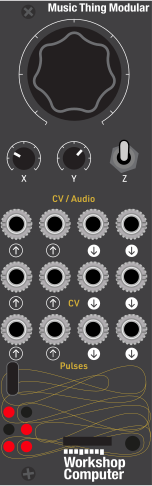 ClockSpeed ASpeed BIn AIn BClockWashRecord ARecord BLeftRightStepped randomSmooth randomRandomStart B
Controls
Clock
Ten steps, 2kHz fully left to 48kHz fully right. Picks up only after passing its last value
Speed A
Six zones: reverse x2, x1, x1/2, then forward x1/2, x1, x2. Picks up only after passing its last value
Speed B
The same, for Loop B. Picks up only after passing its last value
Alt: Main = wash, X = dry level, Y = crush
Play: Main = clock, X = Loop A speed, Y = Loop B speed
Play: Same knob jobs as middle (Down is momentary)
Record: Start recording both loops; tap again to stop and play. A tap while playing records over the old loop. Two taps within 300ms clear both loops
Inputs & Outputs
Inputs
Outputs
Inputs
In A
Loop A's input, and the dry signal (clean, at the dry level)
In B
Loop B's input, normalled to Audio In 1. Patched, the dry signal is the mix of both
Clock
Clock offset, one step per volt (+1V one step faster), with hysteresis
Wash
Added to the Wash knob; +5V is the whole knob
Record A
Start or stop recording Loop A on its own. Acts 20ms after the edge, with the loop's input delayed to match
Record B
Start or stop recording Loop B on its own
Outputs
Left
The dry input, both loops, and the reverb's left side
Right
The same, with the reverb's right side
Stepped random
At each start of Loop A, a new whole volt from -2 to +2V (never the same twice running). Patched into CV In 1, it jumps the clock by whole steps. Holds with no loop playing
Smooth random
At each start of Loop B, a new level from 0 to +5V, eased to over one pass. Patched into CV In 2, the wash comes and goes. Holds with no loop playing
Random
A 10ms trigger at random, 200ms to 2s apart
Start B
A 10ms trigger at each start of Loop B
LEDs
Clock view
For 1.5s after Main turns: fills from the bottom row up, one LED at 48kHz to five and a half at 2kHz
State B (top right)
Speed A (middle left)
Dim at x1/2, brighter at x1, full at x2
Speed B (middle right)
Playhead A (bottom left)
Bright at the loop's start, fading to its end (a falling saw forward, a rising one in reverse). Empty or recording: the input level; full for 100ms on clipping
Playhead B (bottom right)
README
Temperance
A program card for the Music Thing Modular Workshop Computer: two micro loopers sharing one clock, feeding a bit crusher and a washy plate reverb.
The clock sets the loops' sample rate. Slow it down and the loops get longer, lower and grittier in one move: an octave down, twice as long, and the staircase of a 24kHz sample rate. Ten clock steps run from 48kHz down to 2kHz, alternating fifths and fourths, so every move is a consonant one and both loops move together, in harmony.
It takes its idea from Mood, which pairs a wet channel with a looper on one clock. Temperance makes both sides loopers and puts the space at the end of the chain, outside the clock, so the reverb tail stays smooth however slow the clock is.
It sits in the series beside Uncertainty, Impermanence, Equanimity, Constancy and borrows their two-core layout, pickup, test bench and the measured lessons of their reverbs.
Quick start
- Flash
UF2/temperance.0.1.0.uf2. - Patch a sound into Audio In 1 and listen to Audio Out 1 and 2 (stereo).
- Tap the switch down to start recording, play a phrase, tap again to stop. Both loops play straight away, at half speed (an octave down) to begin with.
- Turn X and Y to set each loop's speed and direction, and Main to set the clock.
- Switch up for the wash, the dry level and the crusher.
Controls
| Control | Switch middle: Play | Switch up: Alt |
|---|---|---|
| Main | Clock, ten steps: 2kHz fully left, 48kHz fully right | Wash: the reverb's send, decay and damping in one |
| X | Loop A speed and direction, six zones | Dry level: the clean input, none fully left (loops only), unity fully right |
| Y | Loop B speed and direction, six zones | Crush, 12 bits fully left down to 4 fully right |
| Switch down | Tap: record both loops, tap again to play | The same |
Each knob keeps one value per layer. When the switch moves, a knob does nothing until it passes back through its value for the new layer (pickup), so nothing jumps.
Recording
- Tap to start recording. You hear the input as normal while it records (at the dry level).
- Tap again to stop. The loop plays straight away, from where you started to where you stopped.
- Tap while a loop is playing to record a fresh one over it. The old loop fades out over 20ms.
- Two taps less than 300ms apart clear the loop instead.
- If the buffer fills, recording stops and the loop plays on its own.
The switch records both loops together. Pulse In 1 and 2 start and stop Loop A and Loop B on their own, so the two can have different lengths and phase against each other.
A loop holds 40,000 samples. How long that is depends on the clock:
| Clock | Pitch | Longest loop |
|---|---|---|
| 48kHz | as played | 0.83s |
| 32kHz | a fifth down | 1.2s |
| 24kHz | an octave down | 1.7s |
| 16kHz | an octave and a fifth | 2.5s |
| 12kHz | two octaves | 3.3s |
| 8kHz | two octaves and a fifth | 5.0s |
| 6kHz | three octaves | 6.7s |
| 4kHz | three octaves and a fifth | 10.0s |
| 3kHz | four octaves | 13.3s |
| 2kHz | four octaves and a fifth | 20.0s |
Turning the clock while a loop plays retunes it by the same interval.
Speed (X for Loop A, Y for Loop B)
| Knob | Plays |
|---|---|
| 0 to 17% | Reverse, double speed (an octave up) |
| 17 to 33% | Reverse, as recorded |
| 33 to 50% | Reverse, half speed (an octave down) |
| 50 to 67% | Forward, half speed |
| 67 to 83% | Forward, as recorded |
| 83 to 100% | Forward, double speed |
Half speed sits in the middle of the knob, so the resting position is slow and dark. Each zone boundary needs an extra 3% of turn to cross, so a knob resting on one doesn't chatter. A change of zone glides: the old and new speeds crossfade over 256 clock ticks.
Wash (Main, switch up)
| Wash | Send | Decay | Damping |
|---|---|---|---|
| 0% | none | 0.50 | 0.20 |
| 50% | half | 0.80 | 0.40 |
| 100% | all | 0.93 | 0.60 |
More wash is longer and darker at once. A sound takes about 4 seconds to fade away (by 60dB) at half wash, and about 10 at full wash (measured in the offline build).
Dry level (X, switch up)
The input reaches the outputs clean: at 48kHz, untouched by the clock, the crusher or the reverb, so only the loops get the treatment. X sets how much: fully right (the default) is unity, fully left is none, for loops only. The reverb hears the loops alone at any dry level.
Crush (Y, switch up)
Keeps the top 12, 11, 10... down to 4 bits of the two loops, summed, so it can change live. Twelve is clean; four is ruined in the right way. The dry input is never crushed.
Jacks
| Jack | |
|---|---|
| Audio In 1 | Loop A's input, and the dry signal |
| Audio In 2 | Loop B's input. Unpatched, it's normalled to Audio In 1. Patched, the dry signal is the mix of both |
| Audio Out 1, 2 | Stereo: the dry input and both loops (the same on both sides) and the reverb (left and right) |
| CV In 1 | Clock offset: one step per volt, +1V one step faster. It changes step three quarters of a volt past the last one, so a CV resting on a boundary doesn't flicker |
| CV In 2 | Wash, added to the knob. +5V is the whole knob |
| CV Out 1 | Stepped random, tied to Loop A: at each start of the loop it jumps to a new whole volt between −2V and +2V, never the same one twice running. Calibrated |
| CV Out 2 | Smooth random, tied to Loop B: at each start of the loop it picks a new level between 0V and +5V and eases there over one pass. Calibrated |
| Pulse In 1, 2 | Start or stop recording Loop A, B on its own. A rising edge acts 20ms later (see below), on that loop only |
| Pulse Out 1 | A 10ms trigger at random, 200ms to 2s after the last one, loop or no loop |
| Pulse Out 2 | A 10ms trigger at each start of Loop B: in reverse too, and at every speed |
Patching the CV outs back in
The two random voltages are made for the card's own CV ins:
- CV Out 1 → CV In 1. CV In 1 moves the clock one step per volt, so each start of Loop A jumps both loops by whole clock steps: fifths, fourths, octaves. The clock also sets how long a loop lasts, so each jump changes when the next one comes.
- CV Out 2 → CV In 2. The wash comes and goes around wherever the Wash knob sits, at a pace set by Loop B: a short loop breathes quickly, a long one slowly.
The glide follows the loop's pass at its current pace (clock, speed and length), so turning the clock or the speed mid-pass bends it rather than making it jump. With no loop playing, each CV out holds its last voltage. Both are calibrated (ComputerCard reads each Computer's calibration), so the whole volts land exactly on CV In 1's steps.
LEDs
0 1    Loop A state      Loop B state
2 3    Loop A speed      Loop B speed
4 5    Loop A playhead   Loop B playhead
- State (top): off when empty, a fast blink while recording, on while playing. A stop flashes it full for 80ms.
- Speed (middle): dim at half speed, brighter at normal speed, full at double.
- Playhead (bottom): bright at the loop's start, fading to its end. Forward, that's a flash and a decay; in reverse, a ramp up and a snap off. So direction reads from the shape of the light, and the loop's length reads as rhythm: when the clock drops, both slow together. Empty or recording, it shows the input's level instead, and it holds full for 100ms if the input clips.
Turn Main and the LEDs show the clock for 1.5 seconds. They fill from the bottom up, half an LED per step down from 48kHz: one LED at 48kHz, five and a half at 2kHz. A slower clock looks heavier.
Switch up and each row is a two-LED bar for one knob: wash at the top, dry level in the middle, crush at the bottom. The left LED covers the first half of the knob and the right LED the second. A row breathes slowly until its knob picks up its stored value.
At power-on, one slow chase down the grid shows the card has loaded.
How it works
The clock
A phase accumulator adds the clock's share of 48kHz every sample. Each wrap is a tick. On a tick the loopers record and play one sample each and the crusher updates. Between ticks the loops hold still. That sample-and-hold staircase is the grit at the slow end, and it costs almost nothing. The dry input bypasses all of it.
Audio In 1 --+---------------------------- dry, x level ----------------------+
             +--> 20ms --> Loop A --+                                         |
Audio In 2 --+                      +--> crush --+----------------------> + --+--> Audio Out 1, 2
(normalled   +--> 20ms --> Loop B --+            |                        ^
 to In 1)                                        +--> plate, x send ------+
             |<--- on the sample clock --->|
Storage
Samples are stored at the ADC's own depth, 12 bits, two samples in three bytes, so nothing is lost. That lets two 59KB loops and the reverb's 36KB fit in the RP2040's 264KB beside the program, which runs from RAM.
The loopers
Each read head is fixed-point and moves by its speed every tick. Half speed reads each sample twice. That suits the lo-fi character better than smoothing it over would.
The seam. After the stop tap the looper keeps recording for a few more milliseconds (the tail: 5 to 11ms, whatever the clock). Over the same length at the loop's start it blends from that tail into the loop proper. The loop's first sample is the one that followed its last, so the seam is continuous forward, in reverse and at any speed, and the loop is exactly as long as you played it. Keeping the tail short means a note cut off just after the tap doesn't end up in the seam.
The 20ms wait. ComputerCard tells patched jacks from empty ones by sending a pseudo-random pattern into them. For about 11ms after a cable is pulled out, a Pulse In reads that pattern as a burst of edges, which would start or stop a recording every time something is unplugged. So every record tap, from the switch or a Pulse In, acts 20ms after it happens, and counts only if the jack is still patched by then. The loopers hear their input through a matching 20ms delay, so a loop still starts and ends exactly where you tapped. The dry signal isn't delayed. The same wait keeps the probe's pattern on Audio In 2 out of Loop B when Audio In 2 is unplugged.
The plate
The reverb is Jon Dattorro's figure-of-eight plate ("Effect Design, Part 1", 1997), at a fixed 24kHz, with his delay lengths scaled to suit.
- The input: four allpass diffusers smear it into a wash.
- The tank: two halves feed round into each other, each one darker and quieter every time round.
- The drift: a slow LFO (0.3 and 0.37Hz, ±8 samples) swings the first allpass in each half, so the tank's echoes drift against each other. That drift is most of the washiness.
- Stereo: each output is a sum of seven taps inside the tank.
Each sample does half the work. The even samples take in the input and run the diffusers and the tank's left half; the odd samples run the right half and the outputs. So the reverb's cost is the same on every sample.
Timing
Everything per-sample runs in ComputerCard's audio interrupt on core 0, and
everything else (knobs, pickup, CV, the Wash macro, the LFOs and the LEDs)
once a millisecond on core 1. The card runs at 192MHz
at 1.15V, an officially supported RP2040 setting and a multiple of 48MHz.
The cycle bench (tools/bench) runs the compiled firmware on an emulated
Cortex-M0+ through a scripted performance. Its worst sample comes when both
loops are on their first pass after a stop, with the plate running, all at
48kHz. That sample uses 69% of the 192MHz budget, including ComputerCard's
own work. At the directive's 144MHz it would be 91%.
Where the card differs from the brief
temperance-brief.md is the brief as written. The card follows it except
here:
- 192MHz, not 133MHz. The brief's budget left out ComputerCard's own ~950 cycles per sample, and averaged the reverb's cost over two samples. The worst sample is what has to fit, so it was measured, and the reverb is split evenly across samples.
- The whole program runs from RAM (
copy_to_ram), as the series' other cards do, rather than marking functions__not_in_flash_func. The buffers and the code still fit: 196KB of 256KB. - The seam keeps a tail instead of fading the loop's last 256 ticks into its first. That would shorten every loop by up to 128ms at 2kHz. The tail is 5 to 11ms at every clock rather than 256 ticks. At 2kHz, 256 ticks is 128ms, and anything in that time after the stop tap, such as a note cut off, was part of the seam and clicked on every pass.
- Record taps act 20ms late, with the loopers' input delayed to match, so unplugging a Pulse In never starts or stops a recording.
- A double tap clears a loop, one answer to the brief's open question.
- No delay. The original brief's clocked delay was built, then dropped after listening: it made the mix messy. Its 16KB, and a little of the RAM the brief left spare, went to the loops (59KB each, not 48KB: 20 seconds at 2kHz, not 16), and alt-layer X went to the dry level.
- Random CV outs instead of envelope followers. Ambient loops are mostly level, so their envelopes barely moved. CV Out 1 is a stepped random voltage tied to Loop A's starts, and CV Out 2 a smooth one tied to Loop B's passes, sized for the card's own clock and wash inputs. Pulse Out 1 fires at random instead of at Loop A's start.
- The dry input bypasses the effects, at a level on alt-layer X. The brief ran it through the clocked section, where the crusher made a mess of it. Fully left is the wet-only mode the brief asked about.
- Levels: each loop is at 3/4 in the mix and the plate's output at about 0.23 (Dattorro's is 0.6), measured in the offline renders. At Dattorro's gain, a full wash was 2.4 times the dry.
- The LEDs are driven from core 1, and their values aren't squared:
ComputerCard's
LedBrightnessalready squares them. A playing loop's top LED is a little below full, so the 80ms stop flash shows. - The clock view comes up when Main is turned, not when CV In 1 moves the clock, so a modulated clock doesn't take over the LEDs.
- Two compile-time options are kept but off, in
src/Params.h:kSmooth(a low-pass on the inputs at half the clock) andkCrushFollowsClock(a bit fewer for every two clock steps down). Linear interpolation for the read heads wasn't added. The held, repeated samples are the sound.
Building
Needs the Pico SDK (2.1.1) and the ARM GNU toolchain (14.2.Rel1).
cmake -S . -B build -DCMAKE_BUILD_TYPE=Release -DPICO_SDK_PATH=/path/to/pico-sdk
cmake --build build
The build prints RAM use; build/Temperance.uf2 is the firmware.
Tests and renders run the same instrument code on a computer:
make -C test
make -C test render
The first runs the host tests, grouped by build stage. The second writes
example WAVs to test/out/: the clock walking down and back up, a gritty
3kHz loop under a clean dry input, a full wash, and two loops of different
lengths phasing with no dry.
The cycle bench (see the top of tools/bench/cycles.py for setup):
cmake -S . -B build-bench -DCMAKE_BUILD_TYPE=Release -DTEMPERANCE_BENCH=ON
cmake --build build-bench
venv/bin/python tools/bench/cycles.py build-bench/Temperance.elf 1.0 4000
Credits
By Matt Allison. The design brief is Matt's. The code, tests and this README were written with support from Claude (Anthropic) from the brief, and reviewed against the hardware facts in ComputerCard and the Workshop Computer directive. Each test was conducted on physical hardware before each commit.
Built on ComputerCard
by Chris Johnson (MIT, v0.4.0, vendored in lib/). The plate is Jon
Dattorro's design. Pickup, the two-core parameter hand-over, the
output limiter, the reverb's flush-to-zero writes and the cycle bench come
from earlier cards in this series.
MIT licensed. See LICENSE.