
126 Departures
Departures creates a slowly evolving ambient piece from three breathing chord voices, four independent melody loops and a gliding bass, surrounded by stereo echoes and reverb. Choose shimmering bells or warmer, percussive wood chimes. Shared notes carry through chord changes while accented phrases, occasional octave answers, layer rests and a slow musical tide keep the ensemble moving. Let it play on its own, or use CV to select one of seven scales and prepare chord destinations to commit with a trigger. External clocking, pitch and trigger outputs let the ensemble play alongside other modules, and external audio can join its stereo effects. Main sets activity and internal tempo, X shapes the colour, and Y controls the space.
Panel
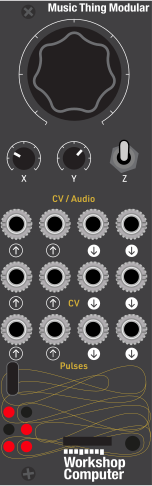 ActivityColourSpaceSpace In LSpace In RScale SelectChord DestinationBeat ClockCommit ChordLeftRightMelody PitchBass PitchMelody TriggerBass Trigger
Controls
Activity
Activity and internal tempo, approximately 36 to 82 BPM. In the Z-down startup selector only, left chooses Bells and right chooses Wood Chimes.
Colour
Pad harmonics and note brightness; in Wood Chimes the strongest change is in the strike resonance.
Space
Echo and reverb blend with longer feedback tails.
Hold: Holds automatic harmony and mutations; prevents new rests and octave answers. External scale changes and chord commits still work; existing rests/answers finish.
Evolve: Harmony moves every 24 beats when CV In 2 is unpatched. With CV In 2 patched, harmony waits for a commit; phrase evolution continues.
Advance: During playback, advances harmony once on entry. Hold Down during boot to choose Bells or Wood Chimes with Main; release to confirm without advancing harmony.
Inputs & Outputs
Inputs
Outputs
Inputs
Space In L
External audio into the effects only; raise Y to hear it.
Space In R
External audio into the effects only; raise Y to hear it.
Scale Select
Approximately 0 to 5V selects seven fixed-D scales directly. LEDs 1 to 3 show the active scale. Unpatched defaults to Dorian; no key transposition in this build.
Chord Destination
Approximately 0 to 5V selects one of seven chord degrees in the active scale without changing harmony. Pulse In 2 commits it; patching this input pauses automatic chord changes.
Beat Clock
One rising edge per beat; replaces the internal clock while connected.
Commit Chord
Commits the CV In 2 destination on a rising edge, including in Hold. With CV In 2 unpatched, advances the normal sequence.
Outputs
Left
Stereo ensemble and effects, left.
Right
Stereo ensemble and effects, right.
Melody Pitch
Most recent melody pitch, 1V/octave with 0V at MIDI 36.
Bass Pitch
Bass target pitch, 1V/octave with 0V at MIDI 36.
Melody Trigger
10ms trigger after approximately 1ms of CV settling; simultaneous notes merge.
Bass Trigger
10ms trigger after approximately 1ms of CV settling.
LEDs
Scale Bit 1 / Pad Breath 1
Physical LED 1. With CV1 patched, weight 1 in scale code 1 to 7; otherwise brightness follows pad voice 1. During startup selection, lit for Bells.
Scale Bit 2 / Pad Breath 2
Physical LED 2. With CV1 patched, weight 2 in scale code 1 to 7; otherwise brightness follows pad voice 2. During startup selection, lit for Wood Chimes.
Scale Bit 4 / Pad Breath 3
Physical LED 3. With CV1 patched, weight 4 in scale code 1 to 7; otherwise brightness follows pad voice 3. During startup selection, lit for Bells.
Melody Activity
Physical LED 4, middle right. Flashes on melody activity during playback; lit for Wood Chimes in the startup selector.
Hold / External Clock
Physical LED 5, bottom left. Bright in Hold, otherwise dim with external clock; off during startup selection.
Timing Warning
Physical LED 6, bottom right. Latches if the audio callback reaches 18 microseconds; reset clears it.
README
Departures
A self-playing ambient ensemble for the Workshop Computer. Choose the original Bells ensemble or warmer Wood Chimes at startup. Stable 0.5.1 lowers the pads by approximately 2.18 dB compared with 0.5.0, giving the melody more room during overlapping pad swells. Melody and bass levels retain their established balance. See the archive for earlier releases and original experiments.
Install and choose a sound
Flash Departures_0.5.1.uf2 using BOOTSEL. It fits both 2MB and 16MB program cards.
- Hold Z Down while powering on or pressing reset, and keep holding it. After the panel settles, the sound-choice LEDs appear. Audio is muted while selecting; incoming musical triggers are ignored.
- Turn Main clearly left of noon for Bells, or right of noon for Wood Chimes. A small centre deadband prevents jitter once a choice is made.
- Release Z to confirm and start. The normal fade-in follows. Main returns to Activity, so adjust it to your preferred playing position after release.
| Startup choice | LEDs lit while holding Z Down |
|---|---|
| Bells | Physical 1 + 3: left column, top two rows |
| Wood Chimes | Physical 2 + 4: right column, top two rows |
Normal boot without holding Down always selects Bells, regardless of Main's position. The choice lasts until reset and is not saved to flash.
What Wood Chimes changes
- The four phrase voices use a rounded fundamental with a rapidly damped upper resonance. Their body rings for less time, with a more percussive, woody attack.
- Each loop has a slightly different resonance relationship. X controls strike brightness; its strongest effect is heard on new strikes.
- The pad has less upper-harmonic emphasis for a warmer accompaniment. X still changes its colour. The bass voice and its level are unchanged.
- The quieter one-quarter melody mix, stored accents, octave answers, note mutations, rests, harmony, tide and external-input send are retained.
Playing controls and jacks
| Control | Function during playback |
|---|---|
| Main | Activity and internal beat rate, approximately 36–82 BPM. |
| X | Palette colour: pad harmonics and new note/strike brightness. |
| Y | Stereo space blend and tails; fully left stays dry. |
| Z Middle | Phrase evolution; automatic harmony only when CV2 is unpatched. |
| Z Up | Hold automatic harmony, mutations and new rests/answers; external scale/chord actions still work. |
| Tap Z Down | Advance one chord in the normal sequence. |
| CV In 1 | Direct scale selection, seven fixed-D scales over nominal 0–5V. |
| CV In 2 | Prepare chord degree I–VII within the current scale. |
| Pulse In 1 | External beat clock; unplug to resume internal timing. |
| Pulse In 2 | Commit CV2's edge-sampled degree, or next chord when CV2 is unpatched. |
| Audio In 1/2 | Summed mono into stereo effects, wet only. |
| Audio Out 1/2 | Stereo ensemble and effects. |
| CV Out 1 / Pulse Out 1 | Latest melody pitch / trigger. Simultaneous notes merge. |
| CV Out 2 / Pulse Out 2 | Bass target pitch / trigger. |
Output tuning remains 1V/oct, 0V = C2 (MIDI36), calibrated where available. Triggers last 10ms after approximately 1ms of pitch settling. The selected palette changes internal audio only, not the pitch/gate amplitudes or the CV roles.
Selecting a scale and reading the LEDs
CV In 1 selects the scale directly; no trigger is needed. All seven scales share a D tonic. Changing CV1 changes the scale even while Z is in Hold.
The six physical LEDs are numbered as follows, viewed from the front:
1 2
3 4
5 6
With a cable plugged into CV In 1, the top two LEDs and the middle-left LED (1, 2 and 3) show the selected scale. Read the combination of lights using the table below. “LEDs lit” lists physical LED numbers: “1 and 3” means the top-left and middle-left LEDs are on, with the top-right LED off.
| CV1 voltage, approx. | Centre voltage to try | Scale | LEDs lit (among 1–3) |
|---|---|---|---|
| 0–0.71V | 0.36V | D Dorian | 1 only |
| 0.71–1.43V | 1.07V | D natural minor | 2 only |
| 1.43–2.14V | 1.79V | D major | 1 and 2 |
| 2.14–2.86V | 2.50V | D Mixolydian | 3 only |
| 2.86–3.57V | 3.21V | D Lydian | 1 and 3 |
| 3.57–4.29V | 3.93V | D Phrygian | 2 and 3 |
| 4.29–5V | 4.64V | D Locrian | 1, 2 and 3 |
For example, apply about 1.79V to CV1: LEDs 1 and 2 light to show D major. Raise it to about 2.50V: only LED 3 lights for D Mixolydian.
Unplug CV1 to return to D Dorian. LEDs 1–3 then gently brighten and dim with the pad voices; they show the scale only while CV1 is patched. Voltage boundaries have a small deadband to prevent flickering between scales, so use the centre voltages above when testing. Negative voltages select Dorian; above 5V selects Locrian.
CV2 chooses a chord, independently
CV In 2 uses the same voltage ranges to prepare chord degrees I, II, III, IV, V, VI and VII, in order, within the scale chosen by CV1. A rising edge at Pulse In 2 commits the prepared chord. The scale LEDs continue to show CV1's scale throughout; changing CV2 does not change their pattern.
Patching CV2 pauses automatic chord progression; unplugging restores it.
Other LED roles
- LED4 (middle right): melody activity.
- LED5 (bottom left): bright in Hold, otherwise dim when an external clock is patched.
- LED6 (bottom right): latched timing warning; reset clears it.
While holding Z Down at startup, LEDs 1–4 temporarily show the sound choice instead: 1 and 3 for Bells, 2 and 4 for Wood Chimes. Normal playback LED roles return when Z is released.
Build and checks
This release includes source, licenses, tests and firmware:
export PICO_SDK_PATH=/path/to/pico-sdk
cmake -S . -B build -DCMAKE_BUILD_TYPE=Release -DPICO_BOARD=pico
cmake --build build -j2
make -C test check preview
python3 tools/package_release.py
Host checks use ASan/UBSan. They retain the 0.4.1 checks and add startup default,
selector mute/debounce, choice hysteresis, boot-gesture isolation, two-palette
score/CV matching, damped wood-voice behaviour and a Wood Chimes stress run.
The preview target generates both three-minute WAVs under test/out/ (not tracked).
The Wood preview includes a half-second boot-selection hold before playback.
Optional compiled ARM timing estimates require separate Unicorn/Capstone packages:
cmake -S . -B build-bench -DCMAKE_BUILD_TYPE=Release -DDEPARTURES_BENCH=ON
cmake --build build-bench -j2
python3 test/bench.py build-bench/Departures.elf
python3 test/bench.py build-bench/Departures.elf --wood
See BUILD_REPORT.md, TEST_PROTOCOL.md, CHANGELOG.md and NOTICE.txt. The catalogue download is the stable image linked above. See experimental/README.md for experiment status and FUTURE_PLANS.md for the completed palette plan. It uses no samples or external sound banks.
Credits and licensing
Departures was developed by Adrian Vos (soveda) with AI assistance from Codex. The original card application is MIT licensed; see LICENSE.
- Charles Vestal — AMB-1: musical inspiration for an ensemble of breathing voices, unequal phrase loops and evolving harmony in an ambient space. AMB-1 is credited as inspiration; its source code, presets, sounds, interface and firmware are not included.
- Chris Johnson — ComputerCard 0.4.0: the unchanged hardware framework, copyright 2024–2026, MIT. The header and license are in vendor/ComputerCard. Upstream ComputerCard.
- Matt Allison — Equanimity: the ARM timing test adapts its cycle model and ComputerCard field-offset helper, copyright 2026, MIT. That testing code is excluded from the normal firmware. Its full license is preserved in licenses/EQUANIMITY_LICENSE.txt. Equanimity also provided a local reference for ambient-card build and hardware setup.
- Raspberry Pi and contributors — Pico SDK: external build dependency and
source of
pico_sdk_import.cmake; SDK license preserved in licenses/PICO_SDK_LICENSE.txt. - ARM GNU Toolchain, GCC runtime and Newlib contributors: firmware build and runtime support; notices in licenses/TOOLCHAIN_NOTICES.txt.
- Tom Whitwell, Music Thing Modular and repository contributors: the Workshop Computer platform, examples, contribution conventions and metadata tooling.
See THIRD_PARTY_NOTICES.md for the dependency inventory
and NOTICE.txt for consolidated redistribution notices. Keep
uf2/NOTICE.txt with the firmware when sharing it.