
50 Flux
Flux is a multi-effects processor, 4-voice polyphonic synthesizer, and CV utility card for the Workshop Computer. Runs dual RP2040 core processing: Core 0 handles a rich stereo FX engine (reverbs, delays, guitar amps, lossy MP3 degradation, pitch shifting, micro-looping), while Core 1 runs 14 synth & sampler engines (wavetables, virtual analog, string modeling, AMY piano, FM, drum kits, granular). The card provides 4 configurable CV/Pulse output utilities (MIDI-to-CV, LFOs, step sequencers, MI Grids drum generator, clock dividers) and integrates with the browser-based Flux Manager for drag-and-drop sample management, patch card sharing, and Web MIDI control.
Panel
 Wet / Dry Mix (Effect Mode)Effect Param 1 (Time / Decay)Effect Param 2 (Tone / Feedback)Audio Input 1 (Left / Mono)Audio Input 2 (Right / Poly Synth)CV Mod XCV Mod YTrigger / GateUtility Clock / ResetOutput 1 (Left)Output 2 (Right)CV Output 1CV Output 2Pulse Output 1Pulse Output 2
Controls
Wet / Dry Mix (Effect Mode)
Blend between dry external audio and selected effect
Effect Param 1 (Time / Decay)
Time, decay duration, or modulation rate depending on selected effect
Effect Param 2 (Tone / Feedback)
Feedback level, tone filter, or depth depending on selected effect
Synth Mode: Main = Envelope/Decay; X = Pitch; Y = Timbre/Color.
Effect Mode: Main = Wet/Dry Mix; X = Param 1 (Time/Decay); Y = Param 2 (Tone/Feedback).
Select Menu & Performance: Hold DOWN: Select Menu (Main = Change Effect, X = Change Synth, Y = Extra Param). Double-hold DOWN: Performance Menu (Main = Internal Tempo, X = Seq A, Y = Seq B).
Inputs & Outputs
Inputs
Outputs
Inputs
Audio Input 1 (Left / Mono)
Main external audio input or synth audio source
Audio Input 2 (Right / Poly Synth)
Right audio input, secondary pitch, or 2-voice polyphonic CV
CV Mod X
Modulates effect time/decay or synth parameter
CV Mod Y
Modulates effect feedback/tone or synth parameter
Trigger / Gate
Primary synth trigger and utility clocking input
Utility Clock / Reset
Secondary pulse control for sequencers and utility clocking
Outputs
Output 1 (Left)
Processed stereo left output or synth voice
Output 2 (Right)
Processed stereo right output or synth voice
CV Output 1
Configurable utility CV out: MIDI Pitch/Vel/CC, ADSR, LFOs, Step/Gen Sequencers
CV Output 2
Configurable utility CV out: Random S&H, LFOs, Sequencer B
Pulse Output 1
Configurable pulse/clock out: MIDI Gate, Clock Div, MI Grids drum map
Pulse Output 2
Configurable pulse/clock out: Sequencer Gates, MI Grids drum gates
LEDs
Status Bit 0 / Voice Active
Displays current effect/synth selection bit 0
Status Bit 1 / Voice Active
Displays current effect/synth selection bit 1
Status Bit 2 / Voice Active
Displays current effect/synth selection bit 2
Status Bit 3 / Voice Active
Displays current effect/synth selection bit 3
Mode Indicator (Synth / Effect)
Indicates active mode (Synth vs Effect)
Voice Announcement / MIDI Activity
Lights during voice announcements or incoming MIDI activity
README
Flux
A multi-effects processor, 4-voice polyphonic synthesizer, and CV utility card for the Workshop Computer.
Flux leverages dual RP2040 core processing: Core 0 runs a rich stereo multi-effects processor, while Core 1 runs 14 synthesizer and sampler engines alongside 4 configurable CV/pulse utility output generators.
- Dual-Core Architecture: Core 0 processes stereo FX (reverbs, delays, guitar amps, lossy MP3 degradation, pitch shifting, micro-looping); Core 1 runs synthesizers, samplers, and output utilities.
- 14 Synth & Sampler Engines: Wavetable, Virtual Analog, String physical modeling, AMY Piano, 6-op FM, Modal, One-Shot/Loop Samplers, Drum Kits, and Granular.
- 4 Utility Output Generators: Assign CV 1/2 and Pulse 1/2 to MIDI-to-CV, ADSR envelopes, multi-shape LFOs, step sequencers, generative sequencers, or a port of Mutable Instruments Grids.
- 4-Voice Polyphony & USB MIDI: Play synthesizers polyphonically using USB MIDI keyboards or external CV/gate inputs.
- Flux Web Manager: Interactive browser app (
web/flux_manager.html) for drag-and-drop sample management, patch card sharing, and utility output configuration.
Videos & Media
- Demo Video: Flux Demo Video
- Tutorial Walkthrough: Flux Tutorial Video
Operating Modes & Switch Controls
Flux uses Switch Z (Up, Middle, and spring-loaded momentary Down) to select control layers:
| Switch Position | Mode Name | Description |
|---|---|---|
| Middle | Effect Mode | Main = Wet/Dry Mix; X = Effect Param 1 (Time/Decay/Rate); Y = Effect Param 2 (Feedback/Tone/Depth). |
| Up | Synth Mode | Main = Envelope Decay; X = Oscillator Pitch; Y = Timbre / Filter Cutoff / Color. |
| Down (Hold) | Select Menu | Main = Select Effect Algorithm; X = Select Synth Engine; Y = Extra Parameter / Cutoff. |
| Down (Double-Hold) | Performance | Main = Master BPM Tempo; X = Sequence A Length/Randomness; Y = Sequence B Length/Randomness. |
Synthesizer Engines (14 Engines)
Toggle Switch DOWN and turn Knob X to select a synth engine:
- External Input: Audio passthrough from inputs into the multi-FX engine.
- Wavetable: Morphing wavetable oscillator (Triangle ➔ Saw ➔ Square ➔ Pulse).
- Virtual Analog: Dual oscillator stack into a resonant filter (Y = Filter Cutoff).
- Strings: Karplus-Strong physical string model (Y = Stiffness and bowing).
- Piano: Additive spectral piano engine powered by AMY (Y = Brightness).
- Modal: Physical modeling of metallic bells, wood blocks, and percussion (Y = Inharmonic structure).
- FM Synth: 6-operator DX7 style FM engine (Main = Env Speed, Y = Mod Depth).
- Noise: White noise generator through a low-pass gate (Y = Filter).
- One-Shot Sampler: Triggered sample playback from flash memory (X = Pitch, Y = Sample Select).
- Looping Sampler: Looping sample playback (X = Pitch, Y = Sample Select).
- Sample Player: Continuous sample player (Main = Length/Direction, X = Pitch, Y = Start Position).
- Drum Sampler: 4-voice sample drum kit triggered via Pulse 1/2 or Audio L/R (Y = Kit Select).
- Granular Sampler: Shared grain pool generator (Main = Density, X = Pitch, Y = Grain Position).
- Drum Synth: Synthesized drum engine (Main = Kick decay, X = Snare, Y = Hi-Hat).
Multi-Effects Algorithms
Toggle Switch DOWN and turn the Main knob to select an effect algorithm:
Dynamics & Amps
- No Effect (Bypass): Passthrough dry audio (X = Synth/input volume).
- Compressor: Dynamic range audio compressor.
- Equalizer: Tone EQ frequency balance.
- Guitar Amp: Guitar amplifier overdrive and cabinet simulation.
Modulation & Pitch
- Tremolo: Amplitude volume modulation.
- Sine Chorus: Smooth sine LFO stereo chorus.
- Vibrato Chorus: Pitch vibrato and chorus modulation.
- Bitcrusher: Bit-depth and sample-rate reduction.
- Pitch Shift: Bipolar pitch shifting.
- Frequency Shift Delay: Frequency shifter with feedback delay.
Delays
- Digital Delay: Clean digital delay line.
- Tape Delay: Warm tape delay with saturation and flutter.
- Ping Pong Delay: Alternating stereo ping-pong delay.
- Tape Loop: Sound-on-sound infinite tape looper.
- Echoverb: Hybrid delay line feeding a reverb tail.
Reverbs
- Plate Reverb: Dense metallic plate reverberation.
- Spring Reverb: Mechanical spring tank reverb with drip.
- Freeverb: Classic Schroeder-Moorer algorithmic reverb.
- Shimmer Reverb: Octave pitch-shifted reverb tail.
- Cathedral Reverb: Large hall and cathedral reverb space.
- Granular Clouds: Granular texture cloud reverb.
- Basic Reverb: Efficient low-resource reverb.
- Allpass Reverb: Allpass filter matrix reverb.
- Hadamard Reverb: Hadamard matrix spatial reverb.
Experimental
- Micro Looper: Audio slice slicer and reverser.
- Tape Degradation: Wow, flutter, and tape wear simulator.
- Lossy Audio: MP3 compression artifacts and packet loss simulator.
- Spectral Freeze: Freezes the frequency spectrum of incoming audio.
- Oil-Can Echo: Dark oil-can delay unit emulation.
- Resonator: Tuned resonant bandpass filter bank.
- Wind: Atmospheric wind generator.
- Chatter: Formant chatter and vocal resonance.
Utility Output Generators
Flux provides 4 assignable hardware outputs configured via the Web UI or double-tap menu:
CV Outputs 1 & 2
- MIDI Pitch / Velocity / CC: Converts USB MIDI input to calibrated 1V/Oct CV and velocity.
- Synth ADSR: Internal envelope generators from synth voices.
- LFO Utility: Multi-shape LFO (Sine, Triangle, Saw, Square, Smooth Random).
- Step Sequencer A & B: Dual 16-step CV sequencers with scale quantization.
- Generative Sequencer A & B: Algorithmic random walk CV generators.
- Clock: Clock division CV ramps.
Pulse Outputs 1 & 2
- MIDI Gate / Trigger: Note gates and trigger pulses from USB MIDI input.
- Clock Out: Master clock pulses with divisions.
- Seq A & B Gate: Gate pulses from step sequencers.
- Mutable Instruments Grids: Drum pattern generator port for driving external drum modules.
Patch Ideas
- 4-Voice Polyphonic FM Synth: Connect a USB MIDI keyboard to the card's USB-C port, select the FM Synth engine, set Switch Z to UP, and select Cathedral or Shimmer Reverb in Effect mode for polyphonic synth pads.
- Lossy Audio Drum Degrader: Route external drum loops into Audio In 1, select the
Lossy Audioeffect in Effect Mode, and adjust Knob X to add MP3 compression artifacts and packet loss textures. - Granular Pitch-Shift Cloud: Route audio into Audio In 1, select
Granular CloudsorMicro Looper, and modulate CV In 1 with an external LFO for evolving granular micro-slice clouds. - Self-Patched Generative Drum Machine: Set Pulse Out 1 and 2 to
Grids(drum map generator), patch Pulse Out 1 into Pulse In 1 (Kick) and Pulse Out 2 into Pulse In 2 (Snare), select theDrum Samplerengine, and adjust Knob X to change drum pattern density.
Flux Web Manager
Open web/flux_manager.html in Chrome or Edge, or visit the online Flux Web Manager.
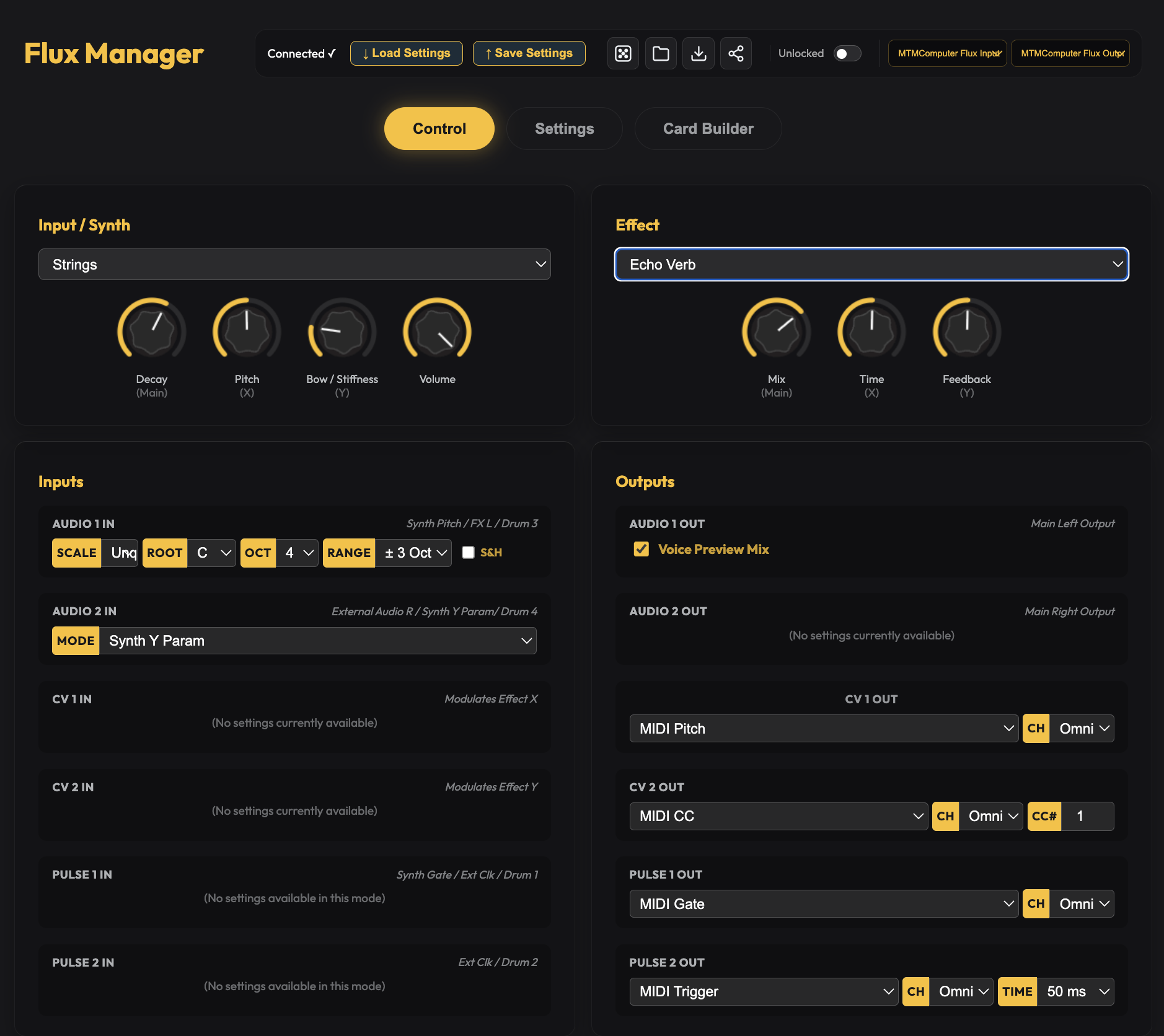
- Engine & Effect Selection: Visual dashboard for switching synth engines, effects algorithms, and voice announcements.
- Drag-and-Drop Sample Builder: Upload custom WAV files, edit start/end loop points, and compile custom sample banks.
- Utility Output Routing: Visual matrix for configuring CV/Pulse output utilities (MIDI-to-CV, LFOs, Step Sequencers, MI Grids).
- Patch Cards Export & Import: Share, backup, and load digital patch card files directly to your card.
Building from Source (Developer Info)
mkdir build
cd build
cmake ..
make
Flash the generated flux.uf2 by holding BOOTSEL while connecting the card via USB-C.
Created for the Music Thing Modular Workshop System by Vincent Maurer with assistance from Google Gemini. Special thanks to Tom Whitwell and Chris Johnson.