
505 Dot Dash
Dot Dash turns a USB keyboard into a Morse code transmitter. Plug a keyboard into the Workshop Computer, type letters, and each character is sent as dots and dashes: a square beep on Audio Out 1, a triangle melody voice on Audio Out 2, a gate on Pulse Out 1, a per-symbol trigger on Pulse Out 2, and a pitch on CV Out 1. Every letter and digit has its own note, rising with the alphabet (A is the lowest), so a typed word becomes a melody. All outputs play together on their separate jacks. Knob X sets the speed (5-40 words per minute), Knob Y the beep pitch, and Knob Main the master audio volume. CV In 1 transposes the notes (1 V/oct, +/-2 octaves), CV In 2 modulates the speed, Pulse In 1 is an external clock (one edge per Morse unit, overriding Knob X while running), and Pulse In 2 clears anything typed but not yet sent. When no keyboard is connected the card loops SOS on the audio, CV and gate outputs and flashes all six LEDs in that rhythm.
Panel
 VolumeSpeedPitchTransposeSpeed ModExternal ClockClearMorse BeepMelody VoiceCharacter PitchSpeed CVKey GateSymbol Trigger
Controls
Volume
Master level for the beep and melody audio outputs (fully down is silent; the CV outputs are unaffected)
Speed
Transmission speed, 5-40 words per minute (before CV In 2 modulation)
Pitch
Beep tone frequency, 300-2000 Hz
Unused: The switch does not change behaviour - all outputs play together on their separate jacks
Inputs & Outputs
Inputs
Outputs
Inputs
Transpose
1 V/oct transpose for the dot/dash notes, clamped to +/-2 octaves
Speed Mod
Adds up to +/-20 WPM on top of Knob X; final speed clamped to 5-60 WPM
External Clock
One rising edge per Morse unit (dot = 1, dash = 3, gaps 1/3/4). Overrides Knob X while the clock is running; reverts to the knob after ~2 s without an edge
Clear
A rising edge discards the typed queue and returns to idle
Outputs
Morse Beep
Square-wave beep for each dot and dash, level set by Knob Main
Melody Voice
Triangle wave at the character's pitch (follows the same note as CV Out 1), level set by Knob Main
Character Pitch
One note per character, rising with the alphabet (A is lowest); dot and dash share it. Holds through letter gaps and drops to 0 V at word gaps or when idle. Calibrated when available, tracks the Transpose input
Speed CV
The current speed as a voltage, 0 V at 5 WPM to +5 V at 60 WPM; derived from the external clock when one is driving the card
Key Gate
High for exactly the length of each dot or dash, low during the gaps
Symbol Trigger
A short ~2 ms trigger fired at the start of each dot or dash
LEDs
Dot
Lit while a dot is being sent
Dash
Lit while a dash is being sent
Transmitting
Lit while any symbol is being sent
Queue Full
Flashes when you type faster than the queue can hold
Clocked
Lit while an external clock on Pulse In 1 is driving the card
Keyboard
Lit while a USB keyboard is connected
README
Dot Dash
A Morse code USB keyboard card for the Music Thing Modular Workshop Computer.
Plug a USB keyboard into the Workshop Computer and start typing. Each character leaves the card as Morse: a beep you can monitor, a gate you can patch, and a note that turns the whole message into a melody.
The name comes from Wire's 1978 song "Dot Dash".
DOT   -.. --- -
DASH  -.. .- ... ....
Quick start
- Flash
dot_dash.uf2. - Plug a USB keyboard into the Workshop Computer.
- Type. You'll hear beeps on Audio Out 1 and see LED 2 light while the card transmits.
Knob X sets speed, Knob Y the beep pitch, Knob Main the volume of the
audio outputs. With no keyboard attached the card still runs,
looping SOS so you can see it's alive.
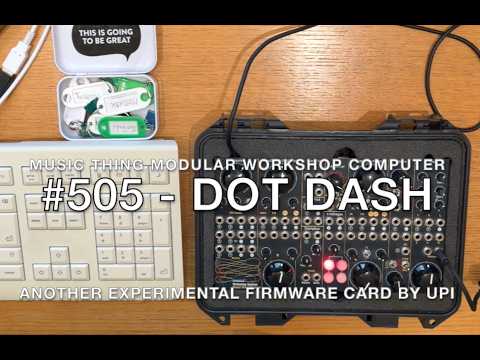
Watch the video
What it does
Every output lives on its own jack and they all play at the same time, so patch the ones you want and ignore the rest. Knob Main is the master level for the two audio outputs.
- Audio Out 1 — square-wave beep for each dot and dash.
- Audio Out 2 — triangle-wave melody voice at the character's pitch, so the Morse becomes a tune without any external gear.
- CV Out 1 — one note per character, climbing with the alphabet: A is middle C (MIDI 60), then up through Z and the digits 0–9. A dot and a dash within one character share that note, so each letter, number, and symbol gets its own pitch and a typed word turns into a melody. The note holds through the gaps inside a character and its letter gap, then drops to 0 V at a word gap or when the card is idle. Uses the card's stored calibration for accurate 1 V/oct when available and a rough voltage when not, and follows the Transpose input.
- CV Out 2 — transmission speed as a voltage: 0 V at 5 WPM, +5 V at 60 WPM.
- Pulse Out 1 — gate high for exactly the length of each dot or dash, low in the gaps.
- Pulse Out 2 — short ~2 ms trigger at the start of each dot or dash. Clock a sequencer on every symbol.
- LEDs — LED 0 lights on dots, LED 1 on dashes, LED 2 while transmitting, LED 3 flashes if you over-type the buffer, LED 4 while an external clock is driving the card, LED 5 while a keyboard is connected.
With no keyboard plugged in, the card loops SOS (... --- ...) on the
audio, CV and gate outputs and flashes all six LEDs together in that rhythm.
It's alive, just waiting for a keyboard.
Controls
| Control | Does |
|---|---|
| Switch | Unused. The outputs always play together on their own jacks |
| Knob Main | Master audio volume. Fully down is silent; the CV outputs are unaffected |
| Knob X | Speed, 5–40 words per minute |
| Knob Y | Beep pitch, 300–2000 Hz |
| CV In 1 | Transpose the notes, 1 V/oct, clamped to ±2 octaves |
| CV In 2 | Modulate the speed, up to ±20 WPM on top of Knob X; final speed clamped 5–60 WPM |
| Pulse In 1 | External clock — one rising edge per Morse unit. Overrides Knob X while running |
| Pulse In 2 | A rising edge clears anything typed but not yet sent |
Morse timing
The card follows the standard "Paris" timing, where one unit is the length of a dot and speed is measured in words per minute:
dot         = 1 unit
dash        = 3 units
symbol gap  = 1 unit   (between the dots and dashes of one letter)
letter gap  = 3 units
word gap    = 7 units   (letter gap plus 4 more, triggered by the spacebar)
The speed is checked every sample, but a dot or dash locks in its length when it starts. Turn the knob mid-symbol and the one already playing finishes unchanged.
If you patch a clock into Pulse In 1, the Morse locks to it instead: every rising edge advances exactly one unit, so a dot is one clock period, a dash is three, and the gaps are one, three, and four edges. A swung or irregular clock bends the timing of the whole message. Knob X is ignored while a clock is running; the first symbol of a message waits for the next edge, so it lands on the beat. Pull the cable, or stop the clock for about two seconds, and the card reverts to the Knob X speed.
Character pitches
Every letter and digit has its own note, rising in order so the alphabet plays as an ascending scale:
A = middle C (MIDI 60)   B = 61   C = 62   ...   Z = 85
0 = 86  1 = 87  ...  9 = 95
A character's dots and dashes sound at that one note. The note is held through the gaps inside the character and its trailing letter gap, then drops to 0 V at a word gap or when the card is idle. Punctuation has no note of its own, so it carries on at the previous character's pitch. The Transpose input shifts the whole ladder up or down.
Characters
Letters A–Z, digits 0–9, the spacebar, and common punctuation
(. , ? ' / ( ) : ; = - _ " @). Morse has no upper case, so letters are
case-insensitive. Keys with no Morse meaning (function keys, arrows, Escape, …)
are silently ignored. The buffer holds 64 characters; type faster than the card
sends and the newest key is dropped while LED 3 flashes.
A little history
Morse code grew out of the electric telegraph, worked out by Samuel Morse and Alfred Vail in the 1830s and '40s as a way to send letters down a single wire using nothing but short and long pulses. It became one of the first practical electric communication systems, and one of the first international standards for encoding text. The first official message went from Washington to Baltimore on 24 May 1844: "What hath God wrought?"
The clever part is that the code isn't arbitrary. Vail counted how often each letter appeared in a newspaper's type case, then handed the most common letters the shortest codes. E is a single dot, T a single dash; rare letters like Q and J need four symbols. It's the same idea behind any good input layout — put the characters you use most where they're quickest to reach. For a computer, it's also just a binary tree: every dot and dash is a left or right turn from the root, and the letters you use most sit closest to the top.
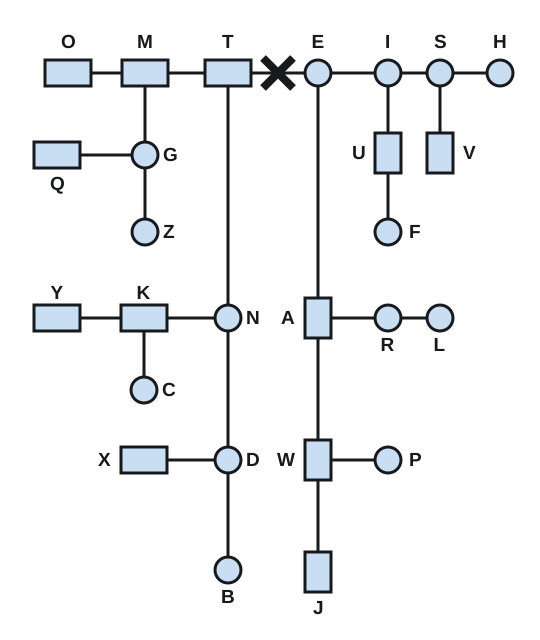
The ten digits are all five symbols long (they live one level below the letters shown here).
Patching ideas
- Beep or melody into a mixer or effects, gate into an envelope: a talking rhythm.
- Character pitch CV into a VCO and gate into an envelope: typed words play as a melody.
- Transpose CV from a sequencer or keyboard: play the Morse at different pitches.
- Speed CV from an LFO: the transmission breathes faster and slower.
- Pulse Out 2 into a clock input: every dot and dash advances a sequencer.
- Clock in from a sequencer or LFO into Pulse In 1: the Morse plays in time with your patch.
- Leave it unpatched with no keyboard to use it as an SOS beacon.
Building
The card builds with the Pico SDK and the ComputerCard library. From the repo root:
./scripts/build.sh releases/505_dot_dash
That produces dot_dash.uf2, copied next to the source. Hold BOOTSEL on the
Workshop Computer, connect USB, release, and copy the .uf2 to the RPI-RP2
drive.
Notes on the implementation
- Two cores. Core 0 runs the TinyUSB host stack and watches for a keyboard.
Core 1 runs
ComputerCard::Run(), the 48 kHz audio engine. They talk through a small lock-free ring buffer of characters plus a couple of volatile flags, so the audio side never blocks waiting on USB. - Integer audio path. All per-sample work (timing, square and triangle
waves, CV) is
int32_t/uint32_tarithmetic. The RP2040's Cortex-M0+ has no floating-point unit and division is slow. The single exception is the melody note's frequency, which uses oneexp2fand only when the note changes, never per sample. - Caching. The WPM division, the melody note's phase step, and the beep pitch are recomputed only when the relevant knob, input, or character changes, keeping the hot path to a few compares.
- Jack detection.
EnableNormalisationProbe()makes unpatched CV/pulse inputs read exactly zero, so with nothing plugged in there is no stray transposition, speed change, or pause. PICO_XOSC_STARTUP_DELAY_MULTIPLIER=64is set inCMakeLists.txt; without it the card can fail after a reset. Code is copied to RAM (copy_to_ram) to remove flash timing jitter from the audio path.
Licence
MIT. ComputerCard.h is © Chris Johnson. TinyUSB configuration adapted from the
ComputerCard hid_keyboard_mouse example.