
61 ZX
A ZX Spectrum in Eurorack. The instrument you never needed.
ZX SPECTRUM (normal boot): a ZX Spectrum 128K in your Workshop Computer. Load .z80/.sna snapshots and .ay/.pt3 chip-music
over a browser Web UI (interface.html, WebMIDI/SysEx).
Each jack/switch
is mappable to a Spectrum key, joystick direction, or a Z80-readable port,
so a Spectrum program can read patched CV/gates as data.
Type into the Spectrum from a laptop via
the Web UI. The baked-in demo's source is a worked example of a
Spectrum program interfacing with the CV world.
Alternatively CV mangle .ay/.pt3 file playback.
ONEBIT (hold the momentary switch DOWN at power-on): a 1-bit "beeper synth" with
seven selectable engines (ports of classic ZX-Spectrum beeper routines) and drums.
Pitch CV, gate, duophony, and a cycleable 'drum kit'.
Panel
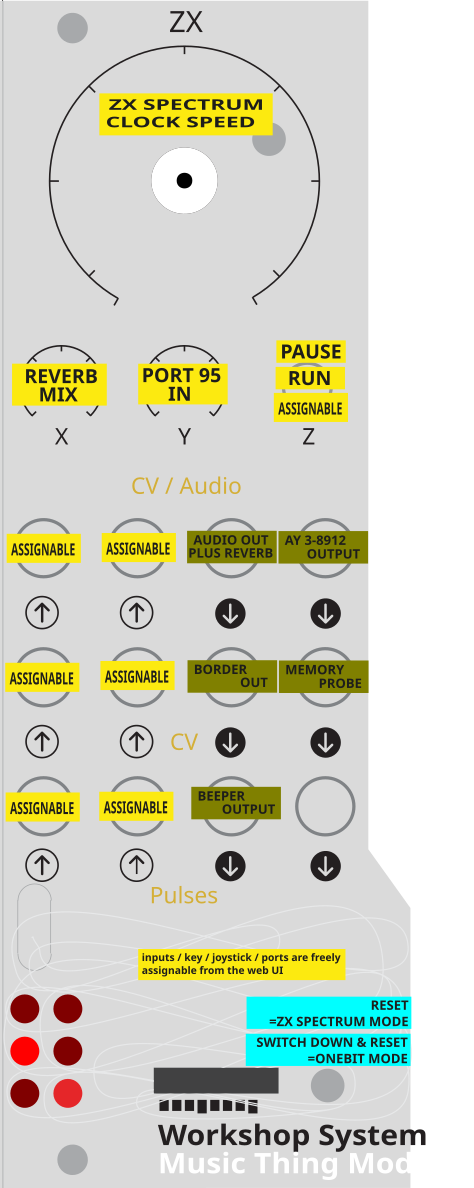
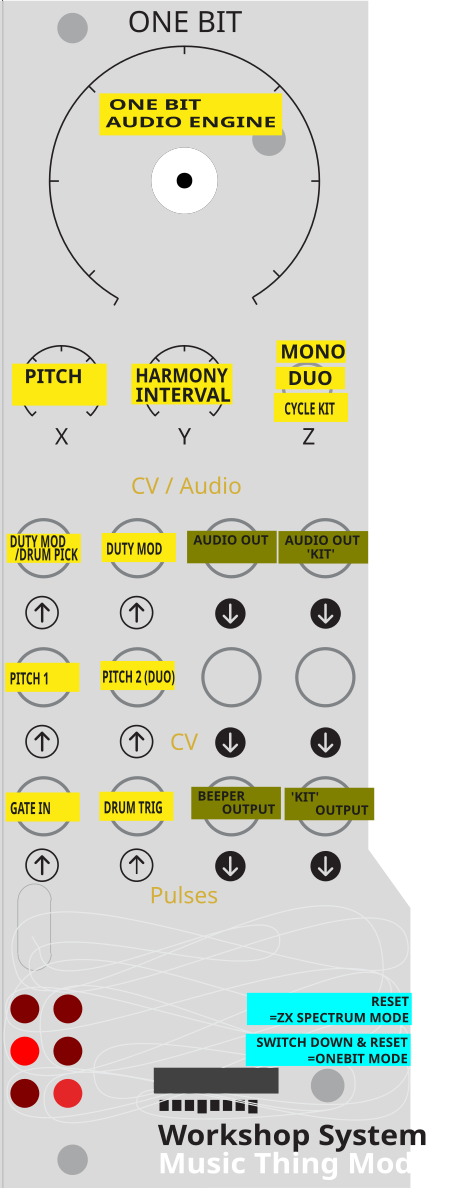
 SpeedReverbPort 0x5FMapped inputMapped inputMapped inputMapped inputMapped gateMapped gateReverbAY soundBorder voltageMemory probeBeeperMIC / tape
Controls
Speed
Emulation speed, with a centre deadzone at exactly 100%.
Reverb
Reverb wet/dry on Audio Out 1.
Port 0x5F
Readable by the running Z80 program at port 0x5F (IN 95) — a knob the Spectrum itself can see.
Up Pause *: Pause the emulator — the position for uploading snapshots and editing the mapping from the Web UI. (* OneBit — duophonic voicing, interval on Knob Y.)
Middle Run *: Run the machine. (* OneBit — voice 2 follows CV In 2, with Knob Y as timbre.)
Down Keypress *: A mappable momentary keypress. HOLD at power-on to boot OneBit instead of the Spectrum. (* OneBit — cycles the drum kit. Positions marked * do something different in OneBit, the alternate boot mode.)
Tap Momentary *: A brief tap — a mappable momentary keypress. (* OneBit — cycles the drum kit.)
Inputs & Outputs
Inputs
Outputs
Inputs
Mapped input
Mappable input, audio-rate (comparator). Read at port 0x33 / 51.
Mapped input
Mappable input, audio-rate (comparator). Read at port 0x63 / 99.
Mapped input
Mappable to a Spectrum key, a joystick direction, or a Z80-readable port (comparator; read at port 0x2B / 43).
Mapped input
Mappable input; also the memory-probe source. Read at port 0x2F / 47.
Mapped gate
Mappable gate — a key, a joystick direction, or a port. Read at port 0x23 / 35.
Mapped gate
Mappable gate. Read at port 0x27 / 39.
Outputs
Reverb
Reverb of the beeper + AY mix; wet/dry on Knob X.
AY sound
The AY-3-8912 output — 128K game audio and .ay/.pt3 music.
Border voltage
The border colour (0-7) as a stepped CV — the classic loading-stripe signal as modulation.
Memory probe
Any RAM address, picked in the Web UI, as 0-5V (byte value 0-255).
Beeper
The ULA beeper (port 0xFE bit 4) — the Spectrum's 1-bit speaker line.
MIC / tape
The ULA MIC/tape output line.
LEDs
Mode / status
Left column shows the machine mode (128K / 48K / AY); right column shows heartbeat, correct-speed lock, and beeper activity.
README
ZX + OneBit — for the Music Thing Workshop Computer
A ZX Spectrum inside your modular. Patch gates and CV into Spectrum games and programs. Patch the beeper, border, AY sound and live memory back out.
A program card for the Music Thing Modular Workshop System Computer that carries two different instruments in one firmware, chosen at power-on:
- ZX — a cycle-accurate ZX Spectrum 128K (Z80 + ULA + banked memory + AY sound
chip) that turns the module's jacks, knobs and switch into a two-way bridge between
the modular and the machine: play games/demos, load snapshots and
.ay/.pt3chip-music, drive the keyboard from CV/gates or a laptop, read patched CV back as data inside a Spectrum program, and take beeper/border/AY out as CV and audio. - OneBit — a 1-bit "beeper synth" that ports classic ZX-Spectrum beeper-music engines. A playable modular voice with pitch CV, gate, duophony and drums.
They're thematically adjacent but used quite differently, so their controls and jack mappings are documented separately below.
Runs on a real Workshop Computer. Built on the RP2040.
Choosing a mode at boot
| At power-on… | Boots |
|---|---|
| Normal (switch not held) | ZX Spectrum |
| Hold the momentary switch Down through startup (~½ sec) | OneBit |
(ZX runs at 200 MHz, OneBit at 144 MHz; the boot dispatcher sets the clock for whichever you choose.)
Panel overlays
Printable panel overlays for both modes are in panels/ — they label
every knob and jack for the mode. The panels below are the quick reference.
| ZX Spectrum mode | OneBit mode |
|---|---|
 |
 |
Mode 1 — ZX Spectrum
What it does
- Cycle-accurate Z80 at the true emulated rate — 3.5469 MHz (128K) or 3.5 MHz (real 48K timing when a 48K program is loaded).
- 128K Spectrum: 128 KB banked RAM, 32 KB ROM,
0x7FFDpaging, the ULA (0xFEbeeper/border), and the AY-3-8912 (3 tones + noise + 8 envelope shapes). 48K programs run too. - Loads
.z80(v1/v2/v3, 48K & 128K),.sna(48K/128K) snapshots, and.ay/.pt3(Vortex Tracker) chip-music. AY tunes run their own Z80 player on the emulated CPU; PT3 modules run against an embedded PT3 player — both via a self-contained IM2 harness. Everything decodes in the browser and streams to the card, so any size fits. - AY-3-8912 uses the measured real-chip volume curve, so tunes play at correct pitch, timing, envelopes and a faithful tone/noise balance.
- A baked-in default program boots at power-on (built from
snapshots/bakedasm.z80); with none present it boots the 128K menu. - Reverb (Freeverb-style) on the beeper+AY mix, wet/dry on Knob X.
Panel (ZX)
| Control | Function |
|---|---|
| Knob Main | Emulation speed — centre deadzone = exactly 100% / real time (speed shifts pitch, so the detent holds true speed). Applies to snapshots and .ay. |
| Knob X | Reverb wet/dry (on Audio Out 1) |
| Knob Y | Readable by the Z80 at port 0x5F (IN 95 in BASIC) |
| Switch Up | Pause (also the moment to use the Web UI) |
| Switch Middle | Run |
| Switch Down | A mappable momentary keypress |
Inputs (ZX)
Every jack + the switch is mapped in the Web UI to one of: a key (held while the input is active), a Kempston joystick direction, a Z80-readable port (the input's live 0–255 value), an AY mangle target (see below), or None. A jack only acts when something is patched in.
| Jack | Default | Mappable to |
|---|---|---|
| Pulse In 1 | ENTER | key / Kempston / port / AY mangle / none |
| Pulse In 2 | SPACE | key / Kempston / port / AY mangle / none |
| CV In 1 | Q | key / Kempston / port / AY mangle / none |
| CV In 2 | A | key / Kempston / port / AY mangle / none |
| Audio In 1 | O | key / Kempston / port / AY mangle / none |
| Audio In 2 | P | key / Kempston / port / AY mangle / none |
| Switch Down | ENTER | key / Kempston / port / AY mangle / none |
Input ports (read with IN A,(port) when a source is mapped to Port):
Knob Y 0x5F (95), Pulse In 1 0x23 (35), Pulse In 2 0x27 (39), CV In 1 0x2B (43),
CV In 2 0x2F (47), Audio In 1 0x33 (51), Audio In 2 0x63 (99), Switch 0x67 (103).
These port numbers are chosen so the emulated machine can never mistake them for real
hardware: each has bits 0, 1 and 5 set, which keeps them clear of the ULA (even ports),
Kempston (bit 5 = 0) and — importantly — the 128K paging latch (bit 1 = 0), so a stray
OUT can't repage RAM under your program. Read them with a high byte below 0x80
(IN A,(n) with a small A, or IN r,(C) with B < 0x80); above that the AY claims
the address. A source that isn't mapped to Port reads 0xFF, like the floating bus.
Mangling the AY (.ay / .pt3 playback)
While the card is playing an .ay/.pt3, a jack can be mapped to an AY mangle
target — live CV control over the sound chip itself, on top of whatever the tune is
doing. These targets are inert in ZX game mode, so one mapping table serves both.
| Target | What the CV does |
|---|---|
| A / B / C duty | Reshapes that channel's square wave — PWM the real chip can't do. Centre = the normal 50% square; moving the CV either way thins the pulse toward a nasal, reedy tone |
| Envelope | Scales the envelope period by up to ±2 octaves either side of whatever the tune set |
| Noise | Bends the noise period — grit and pitch on the noise channel |
| A / B / C mute | Gate-mutes a channel while the input is active (drop the bass, solo a lead) |
Duty, envelope and noise are continuous — they follow the CV, centred so that 0 V (or an unpatched jack) means "no change". Each has a mangle depth slider in the Web UI setting how far the CV pushes it. Mute is a gate: it mutes while the input is high (invertible).
Two details that make these playable rather than merely correct. Duty folds around centre because a square's timbre is symmetric about 50% — 25% and 75% sound identical — so a straight sweep would spend half its travel repeating itself. Envelope scales by ratio, not by a fixed offset, so you get the same musical interval whatever period the tune programmed; an offset would slam to the limit on the short periods most PT3s use and do nothing on long ones.
Playback is bit-identical to the unmangled tune until you actually patch something in.
Write your own — a Spectrum program in the CV world
The real point of ZX mode is to write a ZX Spectrum program that interfaces with the
modular — read patched CV/gates (as keypresses, joystick, or values on the input
ports), do whatever you like in Z80, and drive the beeper / border / AY / memory-probe
CV back out. Write it in BASIC or assembly, assemble/save a .z80 (or .sna), and
either upload it over the Web UI or bake it in as the default.
The baked-in default demo is exactly this — its source is
BakedASM.asm, a small Z80 program that:
- scans the keyboard (so it responds to whatever CV/gates you've mapped to keys),
- reads Port 95 (
IN A,(95)= Knob Y) and uses it to modulate the sound, and - bangs the beeper (
OUT (254),A) → Pulse Out 1.
That's the whole loop — modular in → Spectrum logic → audio/CV out — in ~40 lines.
Start from it. (snapshots/bakedasm.z80 is the assembled version that gets baked in.)
More worked examples — FLASHME/DEMO-SFX*
Four further demos live in FLASHME/, each as source + assembled
snapshot (DEMO-SFX2.asm / DEMO-SFX2.z80, and so on), so you can hear one and
then read exactly how it works. Upload the .z80 over the Web UI.
These are examples, not instruments. They exist to show techniques — how to read a jack, how to build an oscillator in Z80, how to get a signal back out — not because they sound good. Several are harsh, some are barely musical, and one is deliberately a bit broken (see SFX4 below). Treat them as annotated code you can hear, and raid them for parts.
| Demo | What it is |
|---|---|
DEMO-SFX2 |
Six key-triggered SFX engines. Q = VCA decay ping, A = PWM, O = binary rhythmic gating (AM), P = hard-sync vocal formants, SPACE = LFSR noise clock-divider, ENTER = arpeggiator. Knob Y (port 95) does something different in each — envelope length, duty cycle, bitmask, master pitch, sample rate, interval |
DEMO-SFX3 |
Six more, all time-evolving. Q = riser/siren (pitch climbs while held), A = portamento glide, O = charging-capacitor density builder, P = LFO pulse-width sweep, SPACE = sequencer play, ENTER = bitcrush texture morph |
DEMO-SFX4 |
CV-driven oscillator / audio mangler. Pitch from CV In 1, hard sync on Pulse In 1, FM from Knob Y, PWM threshold from Audio In 2, ring-mod invert from Pulse In 2. Switch Down swaps to an audio-thru mode where Audio In 1 gets bitwise-ANDed with CV In 2 (brutal bitcrushing) |
DEMO-SFX5 |
Turing-machine sequencer. Two 8-bit phase accumulators (CV In 1 / CV In 2), each hard-syncable from its Pulse In. Phase A doubles as the shift-register clock divider; the bit shifted in comes from comparing Audio In 1 against Audio In 2. Switch picks continuous morphing vs. stepped CV. Writes to screen memory so CV Out 2's memory probe carries the sequence |
Set up the input mapping first. DEMO-SFX4 and SFX5 read the input ports, so
in the Web UI each jack you want to use must be mapped to → Port — otherwise they
read the idle 0xFF/centre value and nothing appears to respond. DEMO-SFX2/3 are
keyboard-driven instead, so map jacks to keys for those.
DEMO-SFX4's oscillator is an 8-bit phase accumulator: CV In 1 is added straight
to the byte that is the saw wave, so pitch ≈ looprate × CV / 256. The Z80 loop runs
at roughly 18 kHz, putting CV 1 at about 70 Hz and CV 64 around 4.5 kHz. The lower
part of the CV sweep is the musically useful bit — past CV ~128 you're above the
loop's Nyquist and the tone aliases into grit, which is either a bug or a feature
depending on what you're after.
(Accumulator width is the whole ballgame here: routing the same CV through a 16-bit accumulator divides pitch by 65536 instead of 256 and caps the oscillator around 70 Hz — a slow thump rather than a tone.)
Outputs (ZX)
| Jack | Function |
|---|---|
| Pulse Out 1 | Beeper |
| Pulse Out 2 | MIC / tape line |
| CV Out 1 | Border voltage |
| CV Out 2 | Memory probe — a chosen RAM byte (0–255) as 0–5 V (address set in the Web UI; default 16384 = screen memory) |
| Audio Out 1 | Reverb (beeper + AY mix), wet/dry on Knob X |
| Audio Out 2 | AY-3-8912 sound |
| LEDs | Left: mode (128K / 48K / AY). Right: heartbeat / correct-speed / beeper |
Web UI (ZX)
USB-MIDI / WebMIDI SysEx — Chrome or Edge, no install.
Open the web app: https://uglifruit.github.io/WorkshopZX/interface.html (or the local
interface.htmlcopy). Chrome/Edge, plug the card into USB, click Connect. Pause the card (switch Up) while uploading.
- Upload
.z80/.sna/.ay/.pt3. - Remap inputs on a clickable QWERTY keyboard, with Kempston, → Port and ✕ None targets.
- Keyboard passthrough — type into the Spectrum. Shift = CAPS SHIFT, Alt = SYMBOL SHIFT, Shift+0 or Backspace = DELETE.
- Set the CV Out 2 memory-probe address.
Mode 2 — OneBit
A 1-bit beeper synth: a single fast-bitbanged output makes the tone, with pseudo-polyphony faked by interleaving/XOR-ing squares — the classic ZX beeper trick. Seven selectable engines (faithful ports of well-known Spectrum beeper routines) plus drums.
Boot OneBit by holding the switch Down at power-on.
Panel (OneBit)
| Control | Function |
|---|---|
| Knob Main | Engine × decay — seven engine bands (Beep → PlipPlop → Tritone → Qchan → Phaser → Savage → Music Box); within each band the knob sweeps note-decay short → long |
| Knob X | Root pitch (~C1–C6), summed with CV In 1 |
| Knob Y | Switch Up: voice-2 interval (far CCW = solo, then unison / m3 / M3 / P5 / dom7 / octave). Switch Middle: a per-engine timbre control (Phaser detune / Savage skew depth) |
| Switch Up | Duophonic — voice 2 = CV In 1 root + Knob Y interval |
| Switch Middle | Duophonic — voice 2 = CV In 2 (its own 1V/oct); Knob Y = timbre |
| Switch Down | Momentary tap cycles the drum kit (Click → Tritone → PCM → Synth) |
Inputs (OneBit)
| Jack | Function |
|---|---|
| CV In 1 | Voice 1 pitch, 1V/oct (+ Knob X) |
| CV In 2 | Voice 2 pitch, 1V/oct (in Switch Middle) |
| Audio In 1 | Duty / pulse-width mod; also latches the drum select at each Pulse In 2 edge (low = kick … high = snare) |
| Audio In 2 | Duty / timbre mod |
| Pulse In 1 | Note gate — rising edge triggers the envelope, held sustains, falling releases |
| Pulse In 2 | Drum trigger (drum chosen by Audio In 1) |
Outputs (OneBit)
| Jack | Function |
|---|---|
| Pulse Out 1 | 1-bit tone (the true bitbanged beeper output) |
| Pulse Out 2 | 1-bit drum lane |
| Audio Out 1 | Tone density (PCM-style monitor of the tone) |
| Audio Out 2 | Drum density |
| LEDs | Left (0/2/4) = engine number in binary (0–6). Right = note-decay glow (1) / drum kit (3) / drum activity (5) |
*(OneBit uses no Web UI. See its own repo, https://github.com/uglifruit/OneBit, for the full details, build history (DEVLOG) and per-engine credits — that repo is OneBit's standalone development home; the engine here is the same code reused as a boot mode.)*
Under the hood (ZX)
ProcessSample() runs at 48 kHz — far too slow to be the 3.5 MHz Z80 clock — so
work is split across the RP2040's two cores (the repo's second_core pattern):
| Core | Job |
|---|---|
| Core 1 | Free-runs the Z80 + ULA + AY, paced to emulated Spectrum time; also services USB. |
| Core 0 | 48 kHz I/O: latches beeper/AY/border to the outputs, samples the inputs, runs the mapping engine + reverb, presents keyboard/joystick/port state to the Z80. |
They meet through a small lock-free CrossCore struct (single-writer per field). An
instruction-stepped Z80 core keeps it real-time from flash. Emulator setup runs on
core 1, never in the ComputerCard constructor (which would wedge the chip).
Building
Raspberry Pi Pico SDK (2.2.0):
cmake -B build -G Ninja
cmake --build build
Produces build/zx.uf2. Hold BOOTSEL on the Computer's RP2040 and drop it on the
mounted drive. ROM headers and the baked-snapshot header are generated from
roms/*.rom and snapshots/bakedasm.z80 at build time (Python + tools/bin2h.py).
Bake your own default snapshot:
python tools/bin2h.py path/to/game.z80 snapshot_z80 snapshot_data.h
Copyrighted game/.ay files are not committed; only the freely-usable bakedasm
demo is.
Credits
This card stands on a lot of other people's work. Thank you, all of you.
Hardware & framework
- Music Thing Modular Workshop System Computer and the ComputerCard library — Tom Whitwell / Music Thing Modular; ComputerCard by Chris Johnson. The whole card is built on this. (MIT-licensed, header-only.)
- Raspberry Pi Pico SDK / RP2040 — Raspberry Pi Ltd.
ZX Spectrum emulation
- Z80 CPU core —
superzazu/z80by Nicolas Allemand (MIT). Instruction-stepped, passes zexdoc/zexall. Vendored invendor/sz80/with its licence; the only modification is aport16field so the I/O callback receives the full 16-bit port (markedMOD(ZX)in-file). - Sinclair ZX Spectrum ROMs — © Amstrad plc, redistributed with Amstrad's
kind permission (see
reference/ROMS.md). Unmodified images. - Format & hardware references: World of Spectrum and the Sinclair Wiki
(
.z80/.sna/.ayformats,0x7FFDpaging, ULA port decode, AY, Kempston); Sean Young, Z80 Undocumented Documented; Chris Smith, The ZX Spectrum ULA; the zexall test suite; Project AY for the.ayformat. Spectaculator 8 was used as the reference emulator for testing. - AY-3-8912 volume curve from the measured real-chip response (as used by MAME / AY emulators).
- PT3 playback uses the Pro Tracker 3 / Vortex Tracker II player routine (embedded); PT3 format by Sergey Bulba and the Vortex Tracker authors.
- The reverb is a fixed-point take on Jezar at Dreampoint's Freeverb topology.
OneBit beeper engines — from the standalone OneBit synth (reused here as a boot mode); all via Beepola by Chris Cowley:
- Joffa Smith — PlipPlop / Special FX · Shiru — Tritone / Qchan / Phaser / Huby · Jason C Brooke — Savage · Mark Alexander — Music Box · Saa Puica — Music Studio · and above all utz for the 1-bit routine tutorials and community.
This card
- ZX + OneBit for the Workshop Computer — Andy Jenkinson (uglifruit), 2026, with Claude Code (Anthropic).
Licence
Vendored components keep their own licences
(vendor/sz80/LICENSE, ComputerCard.h). The Sinclair ROMs are Amstrad's, used by
permission. No copyrighted game or music files are included.