
610 Aiolos
Aiolos is a six-tube wind chime. The wind is modelled on real measurements, the striker and tubes swing and collide like the real thing, and the chimes ring in a space you choose, from a small porch to a galaxy. It is never the same twice. Since this is a physical simulation, many of its inner signals are natural, organic modulation sources: the wind, each gust, how hard each tube is struck, the striker's swing, the chime turning on its cord. A web editor chooses what the jacks carry. Blow into a microphone to make the wind, let a compressed day of weather play out over an hour, or silence the chimes and use Aiolos as a modulation source and a reverb.
Panel
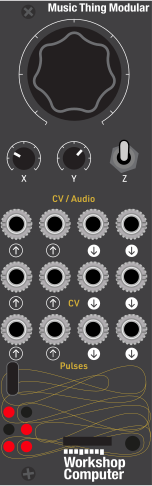 WindDirectionSpaceAudio In (left)Audio In (right)WindDirectionClockGustChime (left)Chime (right)WindPitchStrikeAccent
Controls
Wind
Fully anticlockwise is still air; fully clockwise is a gale
Direction
Where the wind blows from; the chime turns with it
Space
Porch, porch and small garden, garden, woodland, dream, galaxy
Chime layer: Main = the chime, X = the tuning, Y = the key; the LEDs show the choice
Play: The wind, its direction and the space
Hands on: Hold: the chime falls quiet. Two quick taps: weather on or off
Brush: Brush the chime like a passing hand
Inputs & Outputs
Inputs
Outputs
Inputs
Audio In (left)
Joins the chime in the space; or reverb only, or blows the wind (set in the editor).
Audio In (right)
As Audio In 1.
Wind
Adds to Main; +5 V is a whole turn. Changeable in the editor.
Direction
Adds to X, with a glide; +5 V is a whole turn. Changeable in the editor.
Clock
While pulses arrive, each strike waits for the next one. Changeable in the editor.
Gust
Each pulse sends a gust, sized to the wind. Changeable in the editor.
Outputs
Chime (left)
Chime (right)
Wind
Near 0 V in a calm, opening with each gust (0 to 5 V). Eleven sources in the editor.
Pitch
The pitch of each strike, 1 V per octave. Eleven sources in the editor.
Strike
Every strike. Changeable in the editor.
Accent
Only the hardest strikes. Changeable in the editor.
LEDs
Tube 1
Glows as tube 1 (the lowest) rings; the LEDs sit as the tubes hang, round the ring
Tube 4
Glows as tube 4 rings; the LEDs sit as the tubes hang, round the ring
Tube 6
Glows as tube 6 (the highest) rings; the LEDs sit as the tubes hang, round the ring
Tube 2
Glows as tube 2 rings; the LEDs sit as the tubes hang, round the ring
Tube 3
Glows as tube 3 rings; the LEDs sit as the tubes hang, round the ring
Tube 5
Glows as tube 5 rings; the LEDs sit as the tubes hang, round the ring
README
Aiolos
An ambient wind chime instrument, and a playground of generative, physically modelled modulation.
Aiolos is a six-tube wind chime. The wind is modelled on real measurements, the striker and tubes swing and collide like the real thing, and the chimes ring with the sound of real tubes, in a space you choose, from a small porch to a galaxy. It is never the same twice.
Since this is a physical simulation, many of its inner signals are natural, organic modulation sources: the wind, each gust, how hard each tube is struck, the striker's swing, the chime turning on its cord. A small web editor lets you choose which of them come out of the jacks, and what the inputs do.
Start
- Flash the card. Pull off the Computer's big Main knob: the boot select button is behind it, on the right.
Connect the Workshop System's front USB socket to your computer. Hold the boot select button down and tap the reset
button (at the bottom, by the card slot). A drive called RPI-RP2 appears: drag
aiolos.uf2onto it. Put the Main knob back on. - Listen. Patch the Computer's audio outputs to your mixer. With Main at 12 o'clock, a breeze moves the chime.
- Optional: open the editor (
web/index.htmlin Chrome, Edge or Opera) to choose what each jack does.
The controls
| Control | What it does |
|---|---|
| Main | The wind. Fully anticlockwise is still air: the chime falls still. A gentle breeze arrives a few degrees up; fully clockwise is a gale. |
| X | Where the wind blows from. The chime turns with it, and different tubes are reached. Changes glide over about half a second. |
| Y | The space: porch, porch and small garden, garden, woodland, dream, galaxy. |
| Z up | A second layer for the knobs: Main = the chime (aluminium, deep aluminium, brass, glass, bamboo, bell), X = the tuning (major pentatonic, minor pentatonic, C9 chord, Westminster, whole-tone, ominous), Y = the key (six semitones either way). The LEDs show your choice. The knobs pick up where they were when you return to the first layer. |
| Z down, a tap | Brush the chime, like a passing hand. |
| Z down, held | Hands on the chime: it falls quiet. |
| Z down, two quick taps | Weather on or off (see below). On: a wave runs round the LEDs. Off: all six glow steadily. |
| Z middle-up-middle, twice | For added character, you can adjust the output sound: clean, tape (subtle) or tape (worn: more 'wow', warble and flutter). The LEDs show 1, 2 or 3. |
The six LEDs glow as their tubes ring. Aiolos remembers the output sound, the weather and the editor's settings when switched off.
Weather
With the weather on, the wind lives through a day compressed into about an hour, exaggerated: a calm night, a breeze building through the morning, a blustery afternoon, easing back into stillness. The direction wanders and the gustiness rises and falls with it, and no two days are the same. Main sets the middle of the day's range. Leave it running for long pieces and installations.
The jacks (as the card comes)
| Jack | Does |
|---|---|
| CV In 1 | Adds to Main (the wind): +5 V is a whole turn. |
| CV In 2 | Adds to X (the direction): +5 V is a whole turn. It glides, so even a square wave turns the chime smoothly. |
| Pulse In 1 | Clock: while pulses arrive, each strike waits for the next one, so the chime plays in time. |
| Pulse In 2 | Each pulse sends a gust, sized to the wind around it. |
| Audio In 1 / 2 | Your sound joins the chime in the same space, dry and wet. |
| CV Out 1 | The wind: near 0 V in a calm, opening up with each gust and flicking with each strike (0 to 5 V). |
| CV Out 2 | The pitch of each strike, 1 V per octave. |
| Pulse Out 1 | Every strike. |
| Pulse Out 2 | Accents: only the hardest strikes. |
Cables count as plugged in about a tenth of a second after they go in (this keeps the jacks' detection from glitching). A clock pulse reaches your ears about 9 ms later.
The editor
Open web/index.html in Chrome, Edge or Opera, connect the Workshop System by USB and press Connect to the card.
Each jack has a list of choices, and each choice says what it is and gives a patch idea to start from. Changes are
heard at once, and the card remembers them a moment after your last change.
- CV outputs: wind, pitch, strength, the striker's swing (side to side, front to back), gusts, turning, ring, how many tubes are ringing, which tube, brightness. Every one uses its whole range in a gale and sits near 0 V in a calm. Its depth (5, 2, 1 or 0.5 V) tones it down for inputs without their own attenuator, such as an oscillator's pitch, a filter's cutoff or a Slope's rate.
- Pulse outputs: every strike, accents, one tube only (tube 1 is the lowest), clashes, the start of a phrase, a "quiet" gate (high after three seconds of silence) and gusts arriving.
- CV inputs: the wind, the key (1 V per octave), gustiness, the space; the direction.
- Pulse inputs: clock, brush, hold; gust, next chime.
- Audio In: in the space (dry and wet), reverb only (just the wet reverb), or blows the wind: your sound's loudness becomes the wind, and each sudden push sends a gust and a puff through the chime. Try a microphone, and blow (silent: only the wind is heard; heard: your sound plays in the space too). Its level runs from −24 to +12 dB.
- Audio Out: the chime's level, down to silent. The chime plays on inside, so every CV, pulse and light carries on: Aiolos as a modulation source and a reverb.
Two links at the bottom return everything to the default settings, or to the settings the card had when you connected.
Good to know
- On a calm setting the chime has long quiet spells, as a real one does. Turn Main up, or brush it with Z.
- At a fixed direction some tubes are hardly reached, as in a real chime: turn X, or patch an LFO to CV In 2.
- Audio In expects modular levels. For blowing with a quiet source, turn its level up in the editor.
Credits
Aiolos by Joe Hedinger (isbn), designed and built with Claude (Anthropic): the code, the tests and much of this text are AI-assisted. Thanks to Tom Whitwell and Music Thing Modular, and to Chris Johnson for ComputerCard.
- Wind: modelled on 31 hours of 20 Hz sonic-anemometer measurements from the U.S. Department of Energy's Wind Forecast Improvement Project 2 (WFIP2), surface meteorological station met.z19 (University of North Dakota), 1–2 April 2016, used under CC BY 4.0. Aiolos contains statistics fitted to the data, not the data itself.
- Strike timing: fitted to eight wind chime recordings from freesound.org, including two long outdoor recordings by philip_goddard. No audio from them is included.
- Inspiration: the physics of Myra Krusemark's windchimesimulator.com (ideas only; no code used).
Aiolos's own code is © Joe Hedinger; a licence hasn't been chosen yet. It uses ComputerCard by Chris Johnson (MIT licence), the Raspberry Pi Pico SDK (BSD 3-Clause licence) and TinyUSB (MIT licence).
About the name
Aiolos (Αἴολος) is the keeper of the winds in Greek myth: in the Odyssey he gives Odysseus the winds tied up in a bag. The name is better known in its Latin form, Aeolus, as in the Aeolian harp, the instrument the wind plays. Several commercial modular products already use "Aeolus", so this card takes the original Greek spelling, Aiolos, to keep the two apart.
The card's number, 610, comes from the same story: Aiolos appears in Book 10 of the Odyssey, and the chime has 6 tubes.