
63 NIBBLE
Turns the Workshop System's mysterious four buttons into tools to make melodic
lines and lo-fi drum loops.
Patch one output of the FOUR VOLTAGES module into CV In 1, teach the card which
voltage each button combination produces, and the ten combinations become ten
degrees of a scale (MELODY) - or a lo-fi drum kit with a looper behind it
(PERCUSSION), chosen by holding the momentary switch at power-on. The left LED
column at boot means Melody, the right column Percussion.
SETUP: use OUTPUT 1 of Four Voltages with its knob at about twelve o'clock.
That gives ten well-spread, reliably separable voltages. The knob position
matters - it moves all four outputs at once, and towards either extreme
several combinations collapse onto nearly the same voltage.
Four buttons is four bits is one nibble.
THE PROBLEM IT SOLVES: Four Voltages does not return to a rest voltage when you
let go - the output sits at the last-pressed button's level. Releasing A+B
leaves the voltage sitting exactly where pressing A alone would put it, so a
naive design fires a spurious note every time you lift a finger. NIBBLE ignores
that one specific level, and only that one, until the voltage moves somewhere
else.
The payoff is the way you play it: HOLD one button and TAP the others. Hold C,
tap A for one sound, tap B for another, indefinitely, with no ghost notes. The
held finger is a bank select and the tapping finger plays.
Hold the momentary switch for two seconds to calibrate - ten steps, each
confirmed by a tap, with the LEDs laid out in the same 2x2 as the buttons so
the display is the instruction. Calibration is deliberately NOT saved: the
Four Voltages knob changes every voltage it makes, so a remembered calibration
would be a wrong one.
The combinations play scale DEGREES rather than pitches, so the voltage only
ever decides which combination you pressed - move the Four Voltages knob,
re-learn, and the same buttons give you the same notes back. Twelve scales on
Knob Y, ordered dark to bright.
Hold the momentary switch at power-on for PERCUSSION (called DRUMS in the source; the default mode is MELODY, called KEYS). There a SINGLE button is a
shift rather than a sound and only pairs trigger, which is what lets you hold
one button and tap the others to repeat a hit as fast as you like - percussion
is mostly repeated hits on the same drum, and a keyboard reading of the buttons
cannot do that.
TWELVE voices, not six, because holding A and tapping B is a different gesture
from holding B and tapping A. Those close the same switches and give an
identical voltage - press order is not in the signal - but the level the
voltage came FROM is the button that was already down, and latching that
recovers the ordering for nothing.
THE KIT, all synthesised rather than sampled, which is why one knob can
reshape the whole thing: kick (62Hz, swept), deep kick (50Hz), snare (190Hz),
snappy snare (230Hz), closed hat, metallic hi-hat, open hi-hat, crash,
cowbell (1500Hz),
and three Simmons-style toms whose pitch falls exponentially rather than
linearly - the "pew" that a linear sweep cannot produce.
Laid out for the hand: HOLD C and a right hand has closed hat, snare and kick
under three fingers, which is a whole beat without moving. HOLD D is the tom
row for fills. A and B carry the colour and the crash.
A four-bar event looper whose overdub is lossless because it records events
rather than audio, clockable from Pulse In 1, a DJ filter whose movements can
be recorded into the loop, and a click track on Pulse Out 2.
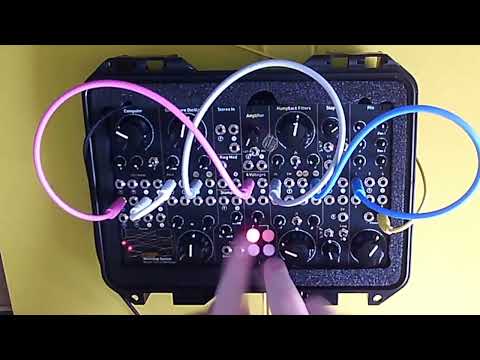
Panel
 Envelopes / DJFilterEnvelopes / TempoScale / KitFour VoltagesTransposeRetrigger / ClkInUnusedEnvelope1 / DrumsEnvelope2 / DrumsPitch / BassHarmony / BassGateGateClick
Controls
Envelopes / DJFilter
MELODY - how long the note lasts, from a click to over five seconds, across both envelopes at once. PERCUSSION - a DJ filter, low-pass to the left, high-pass to the right, with a generous bypass at centre you can find by feel. Its movements are recorded into the loop.
Envelopes / Tempo
MELODY - how the 'filter' and 'loudness' envelopes (Audio1 and Audio 2) respond to MainKnob. PERCUSSION - tempo, 40 to 240 BPM, ignored while an external clock is running on Pulse In 1. Changing it re-times the pattern rather than pitching it.
Scale / Kit
MELODY - one of twelve scales, ordered dark to bright from fully anticlockwise, shown on the LEDs as a bar while you turn it: Phrygian, Hirajoshi, Harmonic Minor, Natural Minor, Minor Pentatonic, m7 Arpeggio, Dorian, Major Pentatonic, Ionian (Major), Maj7 Arpeggio, Whole Tone, Chromatic. Because the ten combinations are ten DEGREES, the scale also sets the range - a four-note arpeggio spreads them over more than two octaves while Chromatic packs them into three quarters of one. PERCUSSION - the…
Glide / Record: MELODY - fast glide between notes instead of stepping; the harmony voice glides with it. PERCUSSION - record and overdub into the loop; the loop keeps running, and because it stores events rather than audio, overdubbing never degrades what is already there.
Step / Play: MELODY - pitch steps straight to each new note. PERCUSSION - the loop plays, and you can play along without recording.
Calibrate: Calibration starts automatically at power-on, since the learned levels are never saved. HOLD for two seconds to start another at any time, or to abort one in progress - and in PERCUSSION this also ERASES the loop, which is the erase gesture. How it ends is on the LEDs: all six ramp up and fade means a clean calibration; the same fade with LEDs 4 and 5 flashing over it means two combinations are too close to separate, so nudge the Four Voltages knob and run it again; the two COLUMNS a…
Retrigger Note: MELODY - re-fires the current note. PERCUSSION - re-strikes the BASS note the held single button is playing, rather than the last drum. A drum is easier to repeat by tapping its pair again, whereas the bassline has no other way to be struck twice at all, since a note only fires when the combination CHANGES - so holding one button gives you a single note and nothing more. This makes the switch a repeat key for the bass. During calibration, captures the combination you are holding.
Inputs & Outputs
Inputs
Outputs
Inputs
Four Voltages
Patch one output of the Four Voltages module here. This is the keyboard. The card learns which voltage each button combination produces, so it works at any position of the Four Voltages knob - re-learn whenever you move it. If two combinations cannot be told apart the card says so during calibration rather than guessing.
Transpose
MELODY - 1V/oct transpose of the whole keyboard, up to two octaves, quantised to semitones so an imprecise voltage cannot leave everything slightly sharp. The root of the scale sits at 0V, so this transposes upward from there, and it is only active when something is actually patched. PERCUSSION - unused.
Retrigger / ClkIn
MELODY - re-fires the current note without changing it, which is how you play repeated notes. PERCUSSION - an external clock at one pulse per beat. It OVERRIDES Knob X for as long as pulses keep arriving and hands the tempo back about three seconds after they stop, snapping to wherever the knob is then pointing. Locks anywhere from 30 to 240 BPM, and nudges into phase rather than snapping, so locking on never stutters the pattern.
Unused
Not used in this version.
Outputs
Envelope1 / Drums
MELODY - the FILTER envelope, roughly 24ms to 3.7 seconds, able to go a little snappier than the loudness envelope for plucks. Knob X decides whether it closes before the note fades or outlasts it. PERCUSSION - the mono drum bus, after the DJ filter. Audio Out 2 carries the SAME bus, not a stereo partner: patch either socket and you get the whole kit.
Envelope2 / Drums
MELODY - the LOUDNESS envelope, roughly 44ms to 5.7 seconds across the macro knob. It is the one standing in for how long the note lasts, so it reaches genuine pad lengths. PERCUSSION - the same mono drum bus as Audio Out 1. They are deliberately identical and nothing splits them, so either socket gives you the whole kit rather than half of it.
Pitch / Bass
MELODY - calibrated 1V/oct pitch, stepped, or glided when the switch is up. The root of the scale is 0V, so an oscillator at its own zero is already in tune. PERCUSSION - a four-note bassline played by the single buttons, which make no drum sound and so had a spare output: A is the root, B a tone below, C the fifth, D the octave. No combos and no scale - once a pattern is looping you can put a simple line under it with the same four buttons.
Harmony / BassGate
MELODY - a second calibrated 1V/oct pitch, a third above the note you played and picked from the same scale, so it lands major or minor according to where in the scale you are. Patch it to a second oscillator with Pulse Out 1 as a shared gate and the ten buttons play two-part harmony. PERCUSSION - a 5V gate whenever a single (shift) button is pressed live, so the bassline on CV Out 1 can have its own envelope without opening on every drum hit. Live presses only - a recorded pattern contains no…
Gate
Fires on every note or drum hit, from the buttons, from a retrigger, or from the loop. In PERCUSSION it also gates the bassline the single buttons play.
Click
PERCUSSION - a click track, one blip per crotchet, running whenever the loop is, so there is something to record along to. MELODY - unused.
LEDs
Buttons A B / C D
Laid out in the same 2x2 as the Four Voltages buttons, and used that way everywhere - they show which combination is currently held, they flash on each hit, and during calibration they show you which combination to press next, so the display is the instruction rather than a code to decode.
Beat
PERCUSSION - pulses on the beat, matching the click on Pulse Out 2. During calibration it marks the four single-button steps. Dark while playing in MELODY - the combo LEDs already show every note, and a second light saying the same thing only competes with them.
Calibration / Record
PERCUSSION - lit while recording. During calibration it marks the six two-button steps. Dark while playing in MELODY - it used to sit on to mean calibrated, which is not something you can act on mid-performance. Collisions are reported once at the end of a calibration instead.
README
NIBBLE — Melody / Percussion
Turns the Workshop System's mysterious four buttons into tools to make melodic lines and lo-fi drum loops.
Four buttons. Fifteen voltages. Ten notes.
A program card for the Music Thing Modular Workshop System Computer that turns the system's Four Voltages module into a playable instrument.
Four Voltages is billed as a "minimum viable keyboard": four non-latching buttons, one knob, four outputs from a resistor network. Press combinations and you get different voltages — but they are arbitrary voltages, they change every time you touch the knob, and nothing downstream knows what to do with them.
NIBBLE learns them. Patch one Four Voltages output into CV In 1, teach the card which voltage each combination makes, and the ten combinations become ten notes of a scale — or a lo-fi drum kit with a looper behind it.
Four buttons is four bits is one nibble. Hence the name.
Watch it work
A two-part demo and walkthrough — calibration, the hold-and-tap technique, and both modes played:
- Part 1 — https://youtu.be/te2GKfyd_0w
- Part 2 — https://youtu.be/mQxKP0NdALI
Two cards in one
| Boot | How | What |
|---|---|---|
MELODY (KEYS) |
normal power-on | A ten-note keyboard: pitch and harmony on 1V/oct, two envelope CVs, a gate. |
PERCUSSION (DRUMS) |
hold the momentary switch at power-on | Twelve percussion voices played shift-and-tap, a four-bar event looper with lossless overdub, a DJ filter, and a bassline. |
The bracketed names are what the modes are called in the source, so the two are easy to match up.
What the LEDs tell you at power-on
The six LEDs are arranged in a 2×3 block, and the top four mirror the Four Voltages buttons throughout the whole card:
0 1        LEDs 0-3 = buttons A B / C D
2 3
4 5
For about a second after power-on, the card says which mode it came up in:
| At power-on | Means |
|---|---|
| Left column (0, 2, 4), steady | MELODY |
| Right column (1, 3, 5), steady | PERCUSSION |
| Either column, but blinking | Booted fine — but the Computer's own CV outputs have no factory calibration, so 1V/oct will not track. Not a NIBBLE fault, and worth knowing before you blame the calibration below. |
The splash then clears and calibration starts on its own. On the bench it reads as one movement: light up, go dark, begin asking for buttons.
Playing it: hold one, tap the others
This is the technique the card is built around, and it is worth learning first.
Hold C. Tap A. You get a closed hat. Let go of A — silence, no retrigger. Tap B. A snare. Let go — silence again. Tap A. Closed hat again.
The held finger is a bank-select; the tapping finger plays. It repeats indefinitely with no spurious hits, and it works exactly the same in MELODY.
That falls out of how the card solves its central problem. Four Voltages does not return to a rest voltage when you let go — the output sits at the last-pressed button's level. So releasing AB leaves the CV sitting at A's voltage, which looks identical to genuinely pressing A. A naive design fires a spurious note every time you lift a finger.
NIBBLE's rule: when a pair is released onto one of its own two buttons, that
one level is ignored. Anything else plays. So AB → release → A is silent, but
AB → release → A → B plays B, because the ghost was A, not B. And once the
voltage moves anywhere else, the ghost is forgotten — so you can come back to A
and it sounds.
Calibrating
The Four Voltages knob changes every voltage it produces, so the card cannot guess and does not try to remember. Teach it whenever you move that knob.
Set it up like this
Use output 1 of the Four Voltages section, with its knob at about twelve o'clock. That gives ten well-spread, reliably separable voltages.
The knob position genuinely matters. It moves all four outputs at once, and towards either extreme several combinations collapse onto nearly the same voltage — at which point no amount of software can tell them apart.
Doing it
Calibration starts on its own at power-up, since the learned levels are never saved and it is the first thing you would do anyway. You can start another at any time by holding the momentary switch for 2 seconds, and abort with the same hold.
Then, for each of ten steps:
- The LEDs show which buttons to press. LEDs 0–3 are laid out exactly like the A B / C D buttons, so the pattern is the instruction — no counting.
- Hold that combination on Four Voltages.
- Tap the momentary switch to capture it.
- All six LEDs flash: got it. Next step.
The order is designed for your hand, not for the computer: the four singles, then the pairs as top row, bottom row, left column, right column, and the two diagonals.
| While it runs | |
|---|---|
| All six flash | captured |
| LEDs 0–3 flutter (the button lights) | the voltage was still moving — hold steady and tap again |
| LEDs 4 and 5 blink (the phase markers) | captured, but too close to an earlier combination to tell apart |
The two warnings use different lights on purpose: the button LEDs mean it was your hand, the marker LEDs mean it was the card.
The collision warning is deliberately quiet. It fires only when two levels land within about 95 mV of each other — well below the point where the card actually starts confusing them — so if you see it, it is worth acting on. A warning that appears on combinations you can play perfectly well just teaches you to ignore it.
How it ends, and what to do about it
| At the end | Means | Do |
|---|---|---|
| All six ramp up and fade | Clean calibration | Play |
| Ramp and fade with LEDs 4 + 5 flashing over it | Done, but two combinations are too close to separate | Nudge the Four Voltages knob, hold the switch 2 s, run it again |
| Two columns alternating fast, ~1.5 s | FAILED — nothing usable arrived | See below |
| All six flash twice | You aborted it | Previous calibration kept |
If it fails, the ten captures spanned less than about 1.2 V — which in practice means nothing is patched into CV In 1, or the cable is dead. The card keeps whatever calibration it had rather than installing a useless one, so nothing is lost by a failed attempt.
If two combinations collide, move the Four Voltages knob a little and run it again. If one output stays stubborn, try one of the other three — they respond differently to the same buttons, and it costs nothing but moving a cable.
Until you have calibrated, the card runs an evenly-spaced guess so it still does something. In MELODY, LED 5 solid means it is running a real calibration; off means it is still guessing.
Learning is not saved across power cycles, deliberately. A stored calibration would be a wrong calibration the moment the knob moved, and a card that looks calibrated but plays the wrong notes is worse than one that admits it knows nothing.
MELODY
Called KEYS in the source. Boots by default.
The ten combinations play ten degrees of the selected scale — not ten pitches. Combination → degree is fixed forever, so re-learning after moving the knob gives you the same notes back. The four bare buttons are the bottom four degrees; adding a second finger climbs.
Panel
| Control | Does |
|---|---|
| Main | Macro: how long the note lasts |
| X | How that length is split between filter and loudness |
| Y | Scale — twelve of them, ordered dark → bright (LEDs show a bar while you turn) |
| Switch UP | Fast glide between notes |
| Switch MID | Stepped pitch |
| Switch tap | Retrigger the current note |
In / out
| Jack | |
|---|---|
| CV In 1 | Four Voltages output — the keyboard |
| CV In 2 | Transpose, 1V/oct, ±2 octaves (only when patched) |
| Pulse In 1 | Retrigger |
| CV Out 1 | 1V/oct pitch, calibrated |
| CV Out 2 | 1V/oct harmony — a third above, in the current scale |
| Audio Out 1 | FILTER envelope |
| Audio Out 2 | LOUDNESS envelope |
| Pulse Out 1 | Gate on every note |
| Pulse Out 2 | (unused in MELODY) |
The two audio outputs carry different envelopes — that asymmetry is the point, and it is what Knob X balances. They are for driving an external filter and VCA: patch them at the Humpback filters and an amplifier and one macro knob shapes the whole voice. They run from about 25 ms to over five seconds, so the macro covers clicks through to long swells. Note the audio outputs are DC-coupled and carry CV happily, but they are not calibrated the way the CV outputs are: fine for modulation, not accurate enough for pitch.
The X knob morphs between three relationships: DARK (the filter closes well before the note fades — plucks and muted things), BALANCED (both together), and BRIGHT (the filter outlasts the amplitude, so the note blooms rather than shutting down — pads and swells).
CV Out 2 is a second voice, not a modulation source: the same note a third higher, picked from whichever scale the Y knob is on, so it is major or minor according to where you are in the scale. Patch it to a second oscillator with Pulse Out 1 as a shared gate and the ten buttons play two-part harmony.
The scales
Twelve, on the Y knob, ordered dark → bright from fully anticlockwise to fully clockwise — so the knob reads as a single mood axis rather than a list, and the LED bar (more light = brighter) matches it.
| Y | Scale | Semitones | Top of the ten |
|---|---|---|---|
| 1 | Phrygian | 0 1 3 5 7 8 10 | +15 (1¼ oct) |
| 2 | Hirajoshi | 0 2 3 7 8 | +20 (1⅔ oct) |
| 3 | Harmonic Minor | 0 2 3 5 7 8 11 | +15 (1¼ oct) |
| 4 | Natural Minor | 0 2 3 5 7 8 10 | +15 (1¼ oct) |
| 5 | Minor Pentatonic | 0 3 5 7 10 | +22 (1⅚ oct) |
| 6 | m7 Arpeggio | 0 3 7 10 | +27 (2¼ oct) |
| 7 | Dorian | 0 2 3 5 7 9 10 | +15 (1¼ oct) |
| 8 | Major Pentatonic | 0 2 4 7 9 | +21 (1¾ oct) |
| 9 | Ionian (Major) | 0 2 4 5 7 9 11 | +16 (1⅓ oct) |
| 10 | Maj7 Arpeggio | 0 4 7 11 | +28 (2⅓ oct) |
| 11 | Whole Tone | 0 2 4 6 8 10 | +18 (1½ oct) |
| 12 | Chromatic | all twelve | +9 (¾ oct) |
The right-hand column is worth noticing: because the ten combinations are ten degrees, a four-note arpeggio spreads them over more than two octaves while the chromatic scale packs them into three quarters of one. Choosing a scale chooses the range as well as the flavour, and the difference is obvious the moment you play it — the arpeggios are the ones to reach for when you want the buttons to cover real ground.
The root of the scale is 0 V, so an oscillator sitting at its own zero is already in tune with the card — no winding it down an octave to find the keyboard. CV In 2 transposes upward from there, up to two octaves.
PERCUSSION
Called DRUMS in the source. Hold the momentary switch at power-on.
Same calibration, same ghost rule — but the buttons work differently, and this is the important part:
A single button is a SHIFT, not a sound. Only pairs make a noise.
Hold one button down and tap the others. Hold C and tap A, B or D for three different sounds; hold D and tap A, B or C for three more. Keep tapping the same one and it repeats cleanly, as fast as you like.
That is there because percussion is mostly repeated hits on the same drum, and a keyboard reading of the buttons cannot do it: to play AC twice you have to pass back through C, and if C were itself a sound then every repeat would be interrupted by a spurious one. Silent singles make the four buttons into bank-selects you can hold for as long as you want.
Twelve voices, because A-held-tap-B is not the same as B-held-tap-A.
Those two close the same switches and produce an identical voltage — press order simply is not in the signal. What the card can see is the level the voltage came from, which is the button that was already down. Latching that recovers the ordering and doubles the kit for free.
| Hold | tap A | tap B | tap C | tap D |
|---|---|---|---|---|
| A | — | cowbell | hi-hat metallic | open hi-hat |
| B | crash | — | kick deep | snare snappy |
| C | closed hat | snare | — | kick |
| D | tom 1 "pew" | syn tom 2 | syn drum 3 | — |
Hold C is the workhorse: with a right thumb on C, A / B / D fall under the fingers as closed hat, snare and kick — a whole beat without moving your hand. Hold D is the tom row for fills. A and B carry the colour, including the crash.
The sounds
All synthesised: a pitched body, a noise component, and an exponential decay on each. Nothing is sampled, which is why the Y knob can reshape the whole kit at once — every number below is a live variable, not a recording.
| Sound | Pitch | Fall | Length | Level |
|---|---|---|---|---|
| kick | 62 → 45 Hz | 6 ms | 182 ms | 100% |
| kick deep | 50 → 38 Hz | 12 ms | 331 ms | 78% |
| snare | 190 → 150 Hz | 3 ms | 36 ms | 74% |
| snare snappy | 230 → 180 Hz | 3 ms | 81 ms | 66% |
| closed hat | 6000 Hz | — | 17 ms | 27% |
| hi-hat metallic | 7600 Hz | — | 9 ms | 31% |
| open hi-hat | 7600 Hz | — | 60 ms | 18% |
| crash | 5200 Hz | — | 343 ms | 9% |
| cowbell | 1500 Hz | — | 57 ms | 16% |
| tom 1 "pew" | 420 → 90 Hz | 49 ms | 156 ms | 47% |
| syn tom 2 | 300 → 110 Hz | 49 ms | 149 ms | 43% |
| syn drum 3 | 360 → 120 Hz | 49 ms | 76 ms | 47% |
Pitch is where the body starts and, where it sweeps, where it lands. Fall is how long that sweep takes — the exponential drop that makes the toms read as Simmons-style rather than as short bass notes. Length is how long the voice stays audible. Level is its weight in the mix, and the numbers look lopsided for a reason: they are set by perceived loudness, not by amplitude.
Two effects drive them. The ear is roughly 24 dB more sensitive at 1 kHz than at 55 Hz, so a bright voice needs far less level than a kick to sit alongside it — which is why the cowbell is 16% and the kick 100%. And the ear integrates over time, so a long voice needs less again: the crash is the longest thing here and sits at 9%.
A rough rule if you edit the table in drums.cpp: an octave higher wants about
half the level, and twice as long wants about two thirds.
The three cymbal voices — hi-hat metallic, open hi-hat and crash — are ring-modulated against a second oscillator at a deliberately non-integer ratio, which is what makes them clang rather than hiss. The plain closed hat is not, so the two hats sit differently in a pattern.
Y shifts the whole kit together: anticlockwise is lower and longer, clockwise higher and shorter, roughly half to double pitch and ±3 decay steps. It applies when a voice is struck, so sweeping the knob never warps a sound that is already ringing — and its movements are recorded into the loop, alongside the filter. Two automation lanes, so a pattern can change its own kit character as it goes.
Sixteen voices can ring at once, and when they are all busy the card steals the quietest rather than the oldest — so a voice near the end of its decay goes before one that has just started.
Panel
| Control | Does |
|---|---|
| Main | DJ filter — low-pass left, bypass at centre, high-pass right — recorded into the loop |
| X | Tempo, 40–240 BPM — ignored while an external clock is running |
| Y | Kit character: lower and longer ↔ higher and shorter — recorded into the loop |
| Switch MID | Play the loop |
| Switch UP | Record / overdub |
| Switch tap | Re-strike the bass note the held button is playing |
| Switch held 2s | Calibrate — and erase the loop |
In / out
| Jack | |
|---|---|
| CV In 1 | Four Voltages output — the buttons |
| CV In 2 | (unused in PERCUSSION) |
| Pulse In 1 | External clock, one pulse per beat — overrides the X knob |
| CV Out 1 | 1V/oct bassline, played by the single buttons |
| CV Out 2 | Gate, 5 V, on each live single press — an envelope for the bass |
| Audio Out 1 | Drum bus, after the DJ filter |
| Audio Out 2 | The same drum bus — either socket gives you the whole kit |
| Pulse Out 1 | Gate on every hit, from the buttons or from the loop |
| Pulse Out 2 | Click track, one blip per beat |
The click runs whenever the loop does, so there is something to record along to. Patch it at a click voice, or just watch LED 4.
Both audio outputs carry the same mono bus. They are not a stereo pair and there is no setting that splits them: patch either socket and you get the whole kit, which is one less thing to get wrong mid-performance.
Riding a recorded knob
Main and Y are both recorded into the loop, and both work the same way live: moving the knob mutes that lane's playback while you move it and for a quarter-second after. Let go and the recorded sweep picks up again from wherever it has reached.
Nothing is destroyed by touching a knob — grab the filter, ride it through a section, let go, and the pattern carries on exactly as recorded. It is a performance override, not a mode.
While recording, a knob writes only where you actually move it. Sweep across half a bar and that half is replaced; the rest keeps whatever was there. A knob sitting still records nothing, so it can never flatten an earlier sweep just by being armed.
Replacement uses a short window rather than an exact instant — about an eighth of a beat — because no two passes over a knob land on precisely the same moments. Anything within the window counts as "the same place" and gets replaced, so re-recording a sweep genuinely overwrites the old one instead of interleaving with it.
A bassline, for free
The four single buttons make no drum sound, so their CV output was going spare. They play four bass notes on CV Out 1 instead — root, a tone below, the fifth, and the octave — gated on Pulse Out 1 alongside the hits.
| Button | A | B | C | D |
|---|---|---|---|---|
| Note | root | −2 | +5th | +octave |
CV Out 2 gates it — a 5 V blip on each shift press, so the bass voice can have its own envelope without opening on every drum hit the way Pulse Out 1 does. Live presses only; a recorded pattern has no shift presses in it.
No combos, no scale, no quantiser. Once a pattern is looping, patch CV Out 1 at an oscillator and put a simple line under it with the same four buttons. It also falls out of the shift gesture for nothing: holding a button to reach the kit holds its bass note too, so the root sustains while you play drums over it.
A bonus rather than the feature — but it costs one table and an output nothing else was using.
The looper
Four bars. It records events, not audio, which is what makes overdub lossless — the twentieth pass sounds exactly like the first, because nothing is ever re-recorded. It is also why the tempo knob re-times a pattern instead of pitching it, and why filter-knob moves can be recorded alongside the hits.
The loop stores which sound — kick, snare, crash — not which buttons made it. How a hit was played belongs to the performance, not the pattern, and it means re-arranging the gesture map can never silently change what an old loop plays back.
Hits are quantised to 1/16 on playback; filter sweeps deliberately are not. Punching in with the switch does not reset the loop position.
Patch a clock into Pulse In 1 and the loop follows it — one pulse per beat. It overrides the X knob for as long as pulses keep arriving, and hands the tempo back about three seconds after they stop, snapping to wherever the knob is pointing by then. It locks anywhere from 30 to 240 BPM, and nudges into phase rather than snapping, so locking on never stutters the pattern.
To erase, hold the switch for two seconds to re-enter calibration. That is the erase gesture: every other control is spoken for while playing, and the four singles in particular get held for long stretches as shifts, so anything button-based would fire constantly. Recalibrating is also the one moment a stale loop is guaranteed to be meaningless — the levels are about to change.
Under the hood
- Everything is fixed-point integer. No floats anywhere in the audio path.
- Level detection settles for ~12 ms before it believes a voltage, with a Schmitt band so two close combinations cannot flicker between each other. Triples and the all-four combination are recognised as not being any learned level, so they do nothing rather than guessing at a neighbour.
- Control logic runs at 3 kHz inside the 48 kHz audio callback; voices, envelopes and the filter run at full rate.
- Single core. There is nothing here that needs a second one.
- ~4.6% of flash and ~8.3% of RAM.
Building
Needs the Pico SDK 2.2.0.
cmake -B build -G Ninja
cmake --build build          # -> build/nibble.uf2
Hold BOOTSEL on the Computer, plug in USB, drag the .uf2 across.
There are Python models of the trickiest logic in tools/ — the ghost rule and
learn round-trip, the filter's stability, and the looper's event ordering. Run
them after touching the corresponding C++.
Status
Working, and played on hardware. Ten rounds of hardware feedback have settled the behaviour: calibration, the ghost rule and triggering were right on first contact, and everything since has been playability — envelope ranges, kit balance, the looper's overdub, the external clock, and how the knobs hand over between your hand and a recorded sweep.
docs/DEVLOG.md records the design decisions and the bugs found along the way,
several of which were only visible because the trickiest logic is modelled in
Python before it is written in C++.
The idea is portable
The calibration and keypress decoding here are not specific to a drum machine or a keyboard. Any card can learn a set of button-combination voltages and act on them — the ghost rule, the shift-and-tap gesture and the ten-step learn are a general technique for making Four Voltages playable. Expect siblings.
Credits
ComputerCard by Chris Johnson (Music Thing Modular), MIT.
The drum voices are generalised from Wild Pebble (Workshop System release 74); the scale tables are from Lockstep (release 89); the degree-indexing approach is from CA Sequencer (release 19); the Schmitt-band quantiser idiom is from Goldfish (release 11); and the state-variable filter's update ordering is from bends (release 45). Thanks to all of them.
Built with Claude Code.
Licence
CC-BY-4.0 — use it, fork it, sell it, just credit Andy Jenkinson (uglifruit).
ComputerCard.h is Chris Johnson's and keeps its own MIT licence.