
669 Computer Tracker
A tracker sequencer with four on-board drum synth voices (Kick with an optional click, Karplus-Strong pluck, pitched noise, FM metal, modal resonator, a snare that morphs into a clap, and a per-voice lo-fi grit), a stereo mixer (a mute on every strip, the reverb return and the master) with a lo-fi stereo reverb on a send (with a per-step send effect), two CV/gate tracks for the Workshop System VCOs, and two IN tracks that play the VCAs on the audio inputs (where the VCO audio comes back in). Each step has a note, a velocity (drum and IN tracks) and one effect. Songs are edited in a browser (Chrome/Edge) over USB-MIDI SysEx and stored in six flash slots; without a computer the card is played from the panel (slots, next part, macros, external clock and reset).
Panel
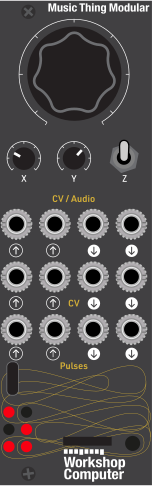 Decay / SlotColour / TempoFilter / SwingIN1IN2TransposeFilter modClockResetMix LMix RPitch 1Pitch 2Gate 1Gate 2
Controls
Decay / Slot
Decay macro on the routed drum voices, CV gate length and IN VCA decay (Perform) or song slot, travel split over the saved slots (Select)
Colour / Tempo
Param A macro on the routed drum voices, CV glide and IN drive (Perform) or tempo 40-240 BPM (Select)
Filter / Swing
Master filter LP-HP (Perform) or swing 50-75 % (Select)
Select: Main = song slot (travel split evenly over the saved slots), X = tempo, Y = swing
Perform: Main = decay macro (drums, CV gate length, IN VCA decay), X = colour macro (drums, CV glide, IN drive), Y = master filter
Start / next / stop: Tap to start or jump to the next part at the end of the pattern; hold 0.8 s to stop
Inputs & Outputs
Inputs
Outputs
Inputs
IN1
Mixer channel IN1 (e.g. VCO 1) through a VCA played by the IN1 track or by CV/gate track 1
IN2
Mixer channel IN2 (e.g. VCO 2) through a VCA played by the IN2 track or by CV/gate track 2
Transpose
Transposes both CV tracks, 1 V/oct, quantised to semitones; folded by octaves so CV out stays 0-5.92 V
Filter mod
Added to the master filter macro (low-pass to high-pass)
Clock
One rising edge advances one row; replaces the internal clock while patched
Reset
Back to the song start (or pattern start in pattern mode)
Outputs
Mix L
Stereo mix (with the reverb return), left
Mix R
Stereo mix (with the reverb return), right
Pitch 1
Calibrated 1 V/oct pitch of CV/gate track 1, C0 = 0 V to B5 = 5.92 V (positive only)
Pitch 2
Calibrated 1 V/oct pitch of CV/gate track 2, C0 = 0 V to B5 = 5.92 V (positive only)
Gate 1
Gate of CV/gate track 1
Gate 2
Gate of CV/gate track 2
LEDs
Beat
Flashes every 4 rows; blinks while a knob waits for pickup. Select page shows one LED per slot (dim = saved, bright = playing, flashing = next).
Play
Dim while playing, blinking while a part change is queued; glows faintly while stopped and the reverb tail is still ringing
Drum 1
Drum voice 1 hits
Drum 2
Drum voice 2 hits
Drum 3
Drum voice 3 hits
Drum 4
Drum voice 4 hits
README
Computer Tracker
▶ Open the web app (Chrome or Edge) · Download the firmware
A tracker sequencer with four drum-synth voices for the Music Thing Modular Workshop System Computer module, plus a browser editor that controls it over USB.
- 4 drum voices on the module, each one of six engines: Kick, Pluck, Noise, Metal, Modal, Snare/Clap.
- 2 CV/gate tracks that play the Workshop System's two analogue VCOs (1 V/oct on CV out 1/2, gates on pulse out 1/2).
- Audio in 1/2 bring the VCOs back into the mix through a VCA each, played by their own IN tracks.
- A stereo mixer with a lo-fi reverb on a send, out on audio out 1/2.
- 16 patterns × 64 rows × 8 tracks, one effect per step, a song arrangement, tempo and swing. All values are typed as 00–99.
- Plays without a computer: 6 song slots in flash, start / next part / stop, knob macros, external clock and reset.

Quick start
- Flash the card: with the card in the Computer and USB plugged in, hold
the BOOTSEL button (behind the main knob), tap the reset button and drag
workshop_tracker.uf2(from Releases ordist/) onto theRPI-RP2drive (official guide). - Patch: audio out 1/2 → headphones or mixer (L/R). For the VCOs see Audio routings.
- Open the editor in Chrome or Edge (WebMIDI with SysEx):
https://gordonbleu-modular.github.io/computer-tracker/ (or locally:
cd web && python3 -m http.server 8000→ http://localhost:8000). - Connect and allow MIDI/SysEx. Edits play on the module at once; Save to module stores the song in the selected slot.
- Unplug USB whenever you like: the module keeps playing from its panel.
The editor also works offline; songs can be exported as .wtrk.json.
The module on its own
| Z | Main | X | Y |
|---|---|---|---|
| Middle (PERFORM) | decay macro (drum voices routed to MAIN, CV gate length, IN VCA decay) | colour macro (param A of the voices routed to X, CV glide, IN drive) | master filter: left low-pass, right high-pass |
| Up (SELECT) | song slot (the knob travel is split over the saved slots) | tempo 40–240 BPM | swing 50–75 % |
| Down (push) | tap: start / next song part · hold 0.8 s: stop |
Macros are offsets on top of the song: never saved, back at noon = the song as programmed. Which voices they reach is set with the MAIN / X buttons on each module in the editor. Knobs use soft takeover. Pulse in 1 is a clock input (1 pulse = 1 row), pulse in 2 resets, CV in 1 transposes both CV tracks, CV in 2 moves the master filter. On power-up the last slot is loaded, stopped. Full control map and LEDs: docs/CONTROLS.md.
Drum voices

Each drum module picks an engine; its faceplate changes with it. All modules have the same knobs:
| Knob | What it does |
|---|---|
| Decay | length of the sound |
| A, B | two sound parameters, different per engine (below) |
| Tune | ±48 semitones on top of the note in the grid |
| Vel | velocity sensitivity, see Velocity |
| Click / Grit | Kick: beater click. All other engines: grit. 0 = off |
| MAIN / X | whether the Main / X macro reaches this voice |
| TRIG | plays the voice once |
| Engine | Sound | A | B |
|---|---|---|---|
| Kick | sine with a falling pitch sweep and soft-clip drive | Sweep: depth of the pitch drop | Drive: saturation |
| Pluck | Karplus-Strong plucked string | Bright: brightness of the pluck | Stretch: low = dark and damped, high = bright and stretched |
| Noise | noise through a resonant band-pass tuned to the note | Reso: from hiss to whistle | Sweep: how far above the note the filter starts before it falls to the note |
| Metal | 2-operator FM with inharmonic ratios: bells, cowbells, metallic hats | Ratio: 16 frequency ratios | Index: FM amount (brightness) |
| Modal | short strike into three tuned resonators | Material: Membrane, Marimba, Glock, Bell, Tube, Plate, Glass, Gong | Strike: hardness of the strike |
| Snare | sine body with pitch drop plus noise, morphing into a clap | Noise: noise against body | Snr>Clap: snare → clap morph |
Kick: Click. A short (≈ 1.5 ms) beater click on top of the kick: high-passed noise and a 1.6 kHz blip, louder with the step velocity, through the kick's drive. Listen: kick_click.wav.
Snare: snare → clap. B up to 44 is the snare (brighter to the right), from 84 on the clap (three noise bursts, further apart to the right). In between the two blend smoothly: the noise colour slides and the clap's extra bursts fade in. Listen: snare_clap_morph.wav.
Grit (Pluck, Noise, Metal, Modal, Snare). A lo-fi fuzz on the voice output: drive into a hard clip, fewer bits and, from 25 % on, a lower sample rate (down to 12 kHz). It makes a voice louder (up to ≈ +10 dB), so turn its mixer level down. Listen: grit_demo.wav. Grit on one or two voices is fine; grit on all four in a very dense pattern with lots of reverb can make the module crackle.
Mixer and reverb
Channels DR1–DR4, IN1, IN2: level, pan, drive, tone (left darker, right thinner, centre flat), send to the reverb and a mute. IN channels also have their VCA (see below). The master has a filter (Y knob) and drive. The REVERB and MASTER strips have live mute switches (not saved).

The lo-fi reverb is a deliberately grainy stereo reverb:
| Knob | What it does |
|---|---|
| Return | wet level into the master (≈ 71 % = 0 dB) |
| Size | room size; turning it bends the tail's pitch a little, like tape |
| Decay | 0.3–9 s |
| Tone | dark … bright tail |
| Lo-fi | clean … gritty: fewer bits, a slow wobble, from 50 % sample-and-hold |
Listen: demo_dry.wav and demo_reverb.wav.
Audio routings with the two VCOs
| Jack | Function |
|---|---|
| CV out 1 / 2 | pitch of CV track 1 / 2, 1 V/oct, C-0 = 0 V … B-5 = 5.92 V (the octave digit is the voltage) |
| Pulse out 1 / 2 | gate of CV track 1 / 2 |
| Audio in 1 / 2 | mixer channels IN1 / IN2, each through a VCA |
| CV in 1 | transposes both CV tracks (1 V/oct, folded back by octaves, never below 0 V) |
| CV in 2 | added to the master filter |
| Pulse in 1 / 2 | clock (1 pulse = 1 row) / reset |
Basic patch: CV out 1 → VCO 1 pitch, CV out 2 → VCO 2 pitch, VCO 1 out → audio in 1, VCO 2 out → audio in 2. The CV / IN tab sets how each input's VCA opens:
- CV GATE: the VCA follows the gate of CV track 1 / 2, so the VCO sounds only while its note plays. The simplest way to a bass or lead line.
- IN TRACK: the VCA is played by its own track (IN1 / IN2): TRIG opens it, LVL sets the level, with hold (G), decay (D), ratchets, probability. The VCO can drone while the IN track chops it into rhythms, independent of the melody on the CV track.
- OPEN: always on, e.g. for a drone, or when an envelope and VCA elsewhere in the System do the shaping.
Per CV track the CV / IN tab also has gate length, glide, transpose, per input decay, hold, drive and the MAIN / X macro routing.
Ideas:
- Pulse out 1/2 → an envelope in the System, shaping the VCO through the System's filter or VCA before it comes back into audio in 1/2: the module becomes sequencer and mixer for a fully analogue voice.
- Both VCOs on the same CV out (CV out 1 to both pitch inputs with a stackable cable) and slightly detuned: one fat voice, IN1 and IN2 panned left and right.
- CV track 1 as a bass line with VCA source CV GATE, CV track 2 as a lead with
Sslides and its VCA played by the IN2 track as rhythmic stabs. - Send IN1/IN2 into the reverb with the
Weffect only on single hits for dub-like throws. - A slow LFO or random voltage into CV in 1 transposes the CV tracks; into CV in 2 it sweeps the master filter.
- An external clock into pulse in 1 syncs the tracker to the System (one pulse per row, swing still applies).

The tracker grid
Columns: drum tracks NOTE VEL FX, CV tracks NOTE FX, IN tracks
TRIG LVL FX. .. = default. Note OFF (key 1) chokes a drum, closes a
CV gate or an IN VCA. Under the grid a keyboard sketch shows which computer
key plays which note (piano layout on Z S X D C… and Q 2 W 3 E…, also on
QWERTZ). Keys in the editor lists every shortcut.
Step effects
Every step has one effect: a letter and a value 00–99. Type the letter in the FX column or press Enter for a list; the status line explains it.
| FX | Tracks | Value | What it does |
|---|---|---|---|
A |
drum | 00–99 | Param A for this hit only (Sweep, Bright, Reso, Ratio, Material, Noise) |
B |
drum | 00–99 | Param B for this hit only (e.g. snare ↔ clap per hit) |
D |
drum, IN | 00–99 | Decay for this hit only (IN: VCA release) |
G |
CV, IN | 00–64 | Gate length in 1/16 row: 08 = half a row, 16 = one row, 64 = four rows, 00 = hold until the next note or OFF |
S |
CV | 00–99 | Slide: glide to this note in the given time (up to ≈ 2 s); the gate stays high (legato) when the previous note is still on |
R |
all | 02–08 | Ratchet: the note repeats 2–8 times inside the row (CV/IN gates: half of each repeat) |
P |
all | 00–99 | Probability in % that the step plays (00 = never; no P = always) |
K |
all | 01–15 | Delay: plays the step n/16 of a row late (08 = half a row, off-beat) |
W |
drum, IN | 00–99 | Reverb send for this hit instead of the Send knob (50 ≈ −12 dB, 99 = full); the hit's tail keeps it, the next hit without W goes back to the knob |
Panel macros add on top of A and D locks just like on the knob values.
Velocity
- VEL column (drum tracks): how hard the step is hit, 01–99;
..= 79 (the default hit). - Vel knob (on each drum module): how much the VEL column changes the
loudness:
level = 127 − (127 − VEL) × Vel / 128(in the internal 0–127 scale). 0 % = every hit at full level (VEL ignored), 100 % = VEL sets the level fully; default 79 %. For example a kick at 0 % always hits full while hats at 100 % follow their accents. Velocity also scales the Kick's click. - LVL column (IN tracks): the VCA level of that trigger,
..= full. - CV tracks have no velocity: a gate is on or off. An IN VCA that follows the CV gate opens fully; the mixer level sets the volume.
More
Protocol and song format: docs/PROTOCOL.md · CPU load: docs/CPU_BUDGET.md · panel details: docs/CONTROLS.md.
License
MIT, see LICENSE. ComputerCard is MIT © Chris Johnson
(vendor/ComputerCard/LICENSE).