
803 8Heads
A stereo tape delay: one loop of tape, recorded from both audio inputs, with eight playback heads along it - one
for each fader of a Music Thing 8mu.
Every head has its own time, volume, pan, stereo width and feedback. The
8mu's buttons choose the page: A is TIME (press again for REVERSE, which
plays a head backwards), B VOLUME (then RATE and BITS, to downsample
and bitcrush each head), C PAN (press again for
WIDTH) and D FEEDBACK (press again for FX). The feedback runs through a
low-pass and high-pass filter and a tape model - saturation, hiss, wow,
flutter and dropouts - on its way back onto the tape, all set from the FX
page, along with the dry/wet mix. Times glide, so moving them bends the
pitch of what is already on the tape.
With a jack in Pulse In 1 (or after two taps on the switch) the heads lock
to the tempo, each a whole number of sixteenths up to a bar, and Main picks
a ratio from /4 to x4. Free, the faders set up to half a second each and
Main multiplies them by x1/4 to x4. X and CV In 1 multiply every head's
volume and feedback; Y and CV In 2 its pan and width. Switch up, or a gate
in Pulse In 2, freezes the tape into a loop.
Eight presets live in the card's own flash, saved and loaded with the 8mu
alone (hold D or A and move a fader), so no computer is needed. An
optional web editor (web/index.html, Chrome or Edge) draws the tape and its
heads live, keeps unlimited presets in the browser, and copies them to and
from the card. With a computer plugged into the Computer's USB socket the
card becomes a USB MIDI device for the editor, and an 8mu plugged into the
computer is passed on through it.
The tape is about 2.2 seconds of stereo at 24kHz, 12 bits, in RAM; any
program card will do.
Panel
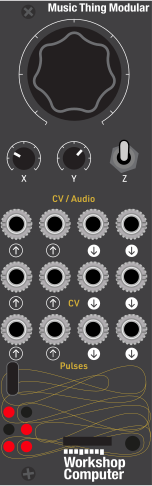 TimeVol / fbPan / widthLeft inRight inVol / fbPan / widthClockFreezeLeft outRight outWobbleEnvelopeBeatFrozen
Controls
Time
Free: multiplies every head's time, x1/4 (fully down) to x4 (fully up), x1 at the centre, gliding like a change of tape speed. Synced: a ratio, in nine equal zones - /4, /3, /2, x2/3, x1 (centre), x3/2, x2, x3, x4.
Vol / fb
Multiplies every head's volume and feedback, x0 to x2, x1 at the centre.
Pan / width
Multiplies every head's pan and stereo width, x0 (all mono, centred) to x2, x1 at the centre.
Freeze: The input is cut and the tape loops the longest head that is playing, so what is on it repeats unchanged.
Run: Normal running.
Tap: Momentary tap tempo. Two taps up to 3s apart set the beat and sync the heads to it; holding it down for 1.5s goes back to free time (all four top LEDs blink).
Inputs & Outputs
Inputs
Outputs
Inputs
Left in
Left input, recorded onto the tape. With nothing in Audio In 2, it feeds both sides.
Right in
Right input, recorded onto the tape. Unpatched, it takes a copy of Audio In 1.
Vol / fb
Added to the X knob; +5V adds x1 to every head's volume and feedback (x0 to x2 in all).
Pan / width
Added to the Y knob; +5V adds x1 to every head's pan and width (x0 to x2 in all).
Clock
One pulse a beat. Plugging a jack in syncs every head to the tempo: to the clock from its second pulse, and until then to the last beat it had (120bpm at first). Taps on the switch are ignored while a jack is in.
Freeze
Freezes the tape while high.
Outputs
Left out
Left output, dry and wet as the Mix fader sets.
Right out
Right output, dry and wet as the Mix fader sets.
Wobble
The tape's wow and flutter, +-5V at full depth.
Envelope
Envelope of the delayed signal, 0 to 5V.
Beat
A trigger every beat while synced, or every free-time length (a fader at the top) while free.
Frozen
High while frozen.
LEDs
Page A / beat
With an 8mu or the web editor, LEDs 0-3 show the button whose page is selected (A-D), steady for its first page and blinking for its second. Without one, LED 0 flashes on the beat.
Page B / synced
Without an 8mu or editor, lit while the heads are synced.
Page C / left
Without an 8mu or editor, the left output level.
Page D / right
Without an 8mu or editor, the right output level.
Input / freeze
The input level; fully lit while frozen.
8mu / editor
Lit while an 8mu, or the web editor, is connected. Blinks when a preset is saved or loaded.
README
8Heads
An eight-head stereo tape delay for the Music Thing Workshop Computer, played from a Music Thing 8mu. There's one loop of tape, recorded from both audio inputs, with eight playback heads along it, one for each 8mu fader.
Each head has its own time, volume, pan, stereo width and feedback. The feedback goes back onto the tape through a low-pass and high-pass filter and a tape model (saturation, hiss, wow, flutter and dropouts). Times glide, so moving a fader or the Main knob bends the pitch of what's already on the tape, the way a tape machine does.
It is built on the same structure as CVSeq and WaveSeq: the same 8mu paging and fader pickup, the same USB host/device split, the same style of SysEx protocol and web editor.
The 8mu
The eight faders are the eight heads. The buttons act when you let go:
| Button | First page | Second page (press again) | Third page |
|---|---|---|---|
| A | Time: each head's delay | Reverse: each head forwards or backwards | |
| B | Volume: each head's level | Rate: each head's sample rate | Bits: each head's bit depth |
| C | Pan: each head's position | Width: each head's stereo width | |
| D | Feedback: how much of each head goes back onto the tape | FX: filter and tape (see below) |
| Gesture | What it does |
|---|---|
| Short press | Chooses the page. Press the same button again for its second page |
| Long press D (½ s) | Freeze on or off |
| Hold A and move a fader | Loads card preset 1-8 (the fader's number). Its LED flashes three times |
| Hold D and move a fader | Saves the current settings as card preset 1-8. Its LED blinks fast |
Faders pick up: after a page change, a fader does nothing until you move it to (or past) the stored value, so nothing jumps. The 8mu's LEDs show the stored values on the current page.
Tilting the 8mu plays the mix. Both tilts ignore about 15° either side of flat, so just holding it changes nothing.
| Tilt | Does |
|---|---|
| Back up / front up | Multiplies every head's feedback, up to ×2 (back lifted) or down to ×0 (front lifted). It stacks with X and CV In 1, so feedback can reach ×4 |
| Left / right | Pushes every head's pan towards the side tipped down, as far as fully left or right at 90° |
Rate and Bits pages (B, pressed twice and three times)
These downsample each head separately, for lo-fi voices alongside clean ones.
- Rate: the head's sample rate, from the tape's full 24 kHz (fader at the top) down to about 250 Hz (bottom). The head holds each sample until its own clock ticks, with no smoothing filter, so it aliases on purpose: crunchy, metallic, and pitched down where the rate is low.
- Bits: the head's bit depth, from the tape's full 12 bits (top) down to 1 bit (bottom). It rounds to the nearest step, so silence stays silent.
Both act on the head before its feedback is taken. A crushed head that feeds back gets crunchier on every repeat. A clean head's feedback stays clean even if another head is crushed.
Presets saved before these pages existed load with every head at full rate and 12 bits.
Reverse page (A, pressed twice)
Each fader has three zones:
| Fader | Head plays |
|---|---|
| Bottom third | Forwards |
| Middle third | Reverse: backwards, free-running |
| Top third | Reverse clocked: backwards, with the slices locked to the beat |
A reversed head plays the tape back in slices as long as the head's time, each slice backwards, arriving on average about one head-time later. That's the classic reverse-delay sound. A short fade (4 ms) at each slice boundary hides the join. Wow and flutter don't apply to reversed heads.
Clocked, the slices follow a beat grid shared by every clocked head. The beat is the clock on Pulse In 1, tap tempo, or, when nothing is synced, the free-time pulse (the Pulse Out 1 rate). A slice a whole number of beats long starts on a beat. A shorter one (say 1/8) starts on the beat and repeats within it, and odd lengths (3/16) cycle against the beat in a fixed pattern. The grid restarts when a jack goes into Pulse In 1 or a tap tempo is first set. The grid follows the clock's actual timing, so a wobbly clock doesn't throw the slices around. If a slice drifts a little off the grid, the head is drawn back by nudging its speed. If it's well off (after a tempo change, or when a head first joins the grid), it fades out, moves, and fades back in over a few milliseconds, so there's never a click. On the 8mu, the Reverse page's LEDs are off for forwards, dim for reverse and bright for reverse clocked.
Presets saved before the Reverse page existed load with every head forwards.
FX page (D, pressed twice)
| Fader | Setting |
|---|---|
| 1 | Low-pass in the feedback path, 150 Hz to 16 kHz, off at the top |
| 2 | High-pass in the feedback path, 30 Hz (bottom) to 2 kHz (top). Always on, so rumble can't build up in the feedback and saturate |
| 3 | Saturation: tape drive on the way onto the tape (×1 to ×4, with the level brought back down, so loud signals get squashed and quiet ones pass at the same level) |
| 4 | Hiss: tape noise, recorded with the feedback so it builds up over the repeats |
| 5 | Wow: a slow, drifting pitch wobble (up to ±10 ms) |
| 6 | Flutter: a fast pitch wobble (up to ±0.4 ms) |
| 7 | Dropouts: random moments where the tape loses level, recorded onto the tape |
| 8 | Mix: dry only (down), both at full level (centre), wet only (up) |
Time
Free (nothing in Pulse In 1, no tap tempo): each fader sets its head from 0 to 0.5 s, and Main multiplies all of them by ×¼ (fully down) to ×4 (fully up), with ×1 at the centre. The longest delay is about 2.2 s.
Synced (a jack in Pulse In 1, or after tapping a tempo): each head is a whole number of sixteenths of a bar of four, from 1/16 (fader down) to a whole bar (fader up), with Pulse In 1 taken as quarter notes. Main chooses a ratio in nine equal zones: /4, /3, /2, ×⅔, ×1 (centre), ×1½, ×2, ×3, ×4. A time longer than the tape is halved until it fits.
Synced mode starts as soon as a jack is in Pulse In 1, detected with the Computer's normalisation probe. The tempo follows the clock from its second pulse; until then it uses the last tempo it had (120 bpm at power-up).
Panel
| Control | Function |
|---|---|
| Main | Time multiplier (free) or clock ratio (synced) |
| X | Volume and feedback multiplier, ×0 to ×2, ×1 at the centre |
| Y | Pan and width multiplier, ×0 (every head mono and centred) to ×2 |
| Switch up | Freeze: the input is cut and the tape loops the longest head that's playing |
| Switch middle | Run |
| Switch down | Tap tempo (momentary). Two taps up to 3 s apart set the beat and sync the heads to it. Hold it down for 1.5 s to go back to free time. While a jack is in Pulse In 1, the clock takes priority and taps are ignored |
| Jack | Function |
|---|---|
| Audio In 1, 2 | Left and right in. With only Audio In 1 patched, it feeds both sides (mono in) |
| CV In 1 | Added to X: +5 V adds ×1 to every head's volume and feedback |
| CV In 2 | Added to Y: +5 V adds ×1 to every head's pan and width |
| Pulse In 1 | Clock, one pulse a beat. Plugging a jack in syncs the heads |
| Pulse In 2 | Freeze while high |
| Audio Out 1, 2 | Left and right out |
| CV Out 1 | The tape's wow and flutter, ±5 V at full depth |
| CV Out 2 | Envelope of the delayed signal, 0 to 5 V |
| Pulse Out 1 | A trigger every beat (synced), or every free-time length when free |
| Pulse Out 2 | High while frozen |
| LED | Shows |
|---|---|
| 0-3 | With an 8mu or the editor connected: the page's button (A-D), blinking for its second page. Without one: beat, synced, left level, right level |
| 4 | Input level; fully lit while frozen |
| 5 | 8mu or editor connected; blinks when a preset is saved or loaded |
Presets
On the card: there are eight presets in the program card's flash (its last 4 kB sector, which every card has, so a 2 MB card is enough). Save and load them with the 8mu alone (hold D or A and move a fader), or from the web editor. At power-up the card loads whichever preset you last saved or loaded.
In the browser: the web editor keeps as many presets as you like, exports and imports them as JSON, copies any of them into a card slot, and backs up the card's eight presets.
Web editor
Open web/index.html in Chrome or Edge, plug a computer into the Computer's
USB socket, power-cycle the module, then press Connect card & 8mu. The
editor draws the tape with each head at its live delay, shows the tempo and
the knobs, and lets you edit every page, freeze and tap. An 8mu plugged into
the computer is passed on to the card through the editor.
With two 8mus and several Workshop editors open (8Heads, MatrixVerb, CVSeq, WaveSeq), each 8mu drives one editor and each editor uses one 8mu: it takes the one it had last time if that's free, otherwise any free one. The picker at the top shows every 8mu and who has it; choose one to take it, and Identify flashes its LEDs to tell which is which. With one 8mu it drives whichever editor you last clicked in. Closing an editor frees its 8mu. Use windows side by side rather than tabs: Chrome slows background tabs.
The card chooses its USB mode once, at power-up: if the port is supplying
power (an 8mu, or nothing yet), it's a USB host for the 8mu; if a computer is
plugged in, it's a USB MIDI device called 8Heads for the editor. The
card runs on its own either way. The protocol is documented in sysex.h.
Tips
- Ping-pong: give two heads a width of 0 (so each takes the mono sum), pan one hard left and one hard right, and give the right-hand one some feedback. The built-in Ping-pong preset in the editor does this.
- Runaway: with X above the centre, feedback can go past 100%, and the tape then settles into its own saturation rather than clipping hard. Pull the low-pass down to tame it.
- Freeze, then play the heads: freeze the tape, then move the Time faders or Main: the heads slide around the frozen loop with tape-style pitch bends.
How it works
- The tape is a buffer in RAM: stereo, 12 bits a sample, at 24 kHz (about 2.2 s). Recording at half the output rate is what makes the tape long enough, and it gives the echoes a slightly darker sound than the dry signal, as on real tape.
- Heads read between tape frames with linear interpolation, and each head's delay glides (a one-pole of about 80 ms, limited to 1.5× tape speed), which produces the pitch bends.
- All the DSP is fixed-point, and the per-head control work is spread across the 32-sample control period so that no single sample has too much to do.
- A 16 MB card doesn't help here. Flash is far too slow to write a delay line to in real time, so the tape has to live in the RP2040's 264 kB of RAM, which limits it to about 2.2 s. Presets use flash, but they only need 4 kB.
Building
mkdir build && cd build
cmake .. && make
Needs the Pico SDK (built and tested with 2.1.1). EightMU.h and
ComputerCard.h are copied from Demonstrations+HelloWorlds/PicoSDK/ComputerCard.
The binary runs from RAM (copy_to_ram), so the USB core can write presets
to flash while the audio core keeps running.