
41 Blackbird
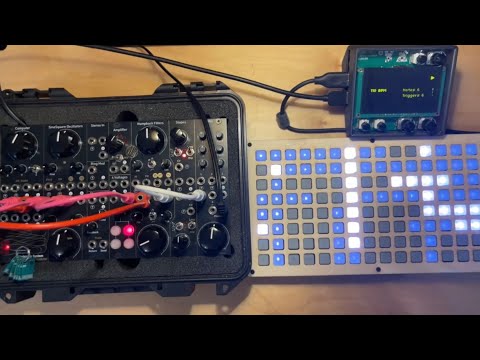
Blackbird runs crow-compatible Lua scripts over USB serial and can also store scripts on card flash.
Panel control behavior is script-defined: Lua code reads bb.knob.*, bb.switch.position, and inputs,
then decides how outputs respond. Scripts can send and receive USB MIDI and I2C messages for added connectivity. Version 1.2 has dramatically
improved performance as well as addressing a bunch of requests and bugs that were reported in version 1.1.
Panel
Blackbird basics
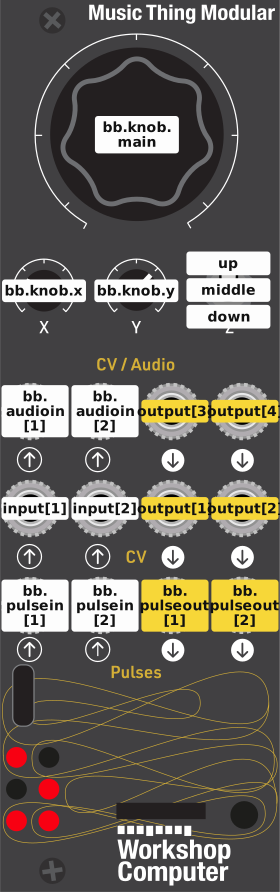
Blackbird speaks the same language as monome crow: it runs crow's Lua scripts, and anything that talks to crow over USB (druid, web-druid, norns, Max for Live) talks to blackbird the same way, without knowing the difference. Crow's documentation and script reference apply as they are, with the jacks mapped as shown here.
Getting started
- Connect the Computer's USB to a computer and open web-druid (or druid). Wait until blackbird has started: its welcome message appears and the bottom-left LED flashes.
- Type Lua at the prompt, for example
output[1].volts = 3. - Upload a script with druid's
u(saved to the program card and run at power-up) orr(run without saving). It starts straight away. Make the first line start with---to name it: the name is printed at startup.
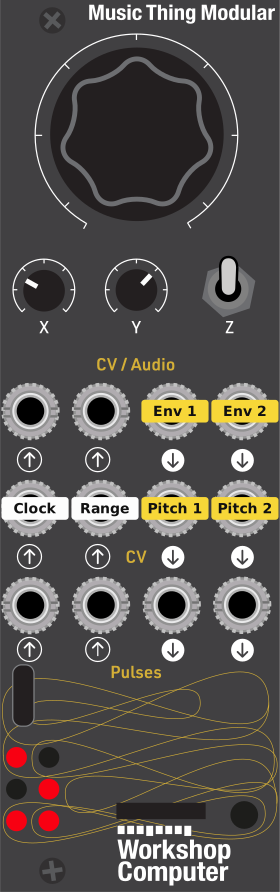
With no script uploaded, blackbird runs First.lua, crow's "unique melody box".
Jacks
| Lua | Jack | |
|---|---|---|
input[1], input[2] |
CV In 1, 2 | crow's inputs: .volts, stream, change, window, freq, ... |
output[1], output[2] |
CV Out 1, 2 | crow's outputs, calibrated |
output[3], output[4] |
Audio Out 1, 2 | crow's outputs, not calibrated: best for audio-rate ASL and envelopes |
bb.audioin[1], bb.audioin[2] |
Audio In 1, 2 | .volts, read only |
bb.pulsein[1], bb.pulsein[2] |
Pulse In 1, 2 | .state and change callbacks (pulse inputs) |
bb.pulseout[1], bb.pulseout[2] |
Pulse Out 1, 2 | :high(), :low(), pulse() actions and :clock(division) (pulse outputs) |
bb.knob.main, .x, .y |
Main, X, Y knobs | 0 to 1 (knobs and switch, knobs in ASL) |
bb.switch.position |
Z switch | 'up', 'middle' or 'down', with a bb.switch.change callback |
The knobs and switch do nothing until a script uses them. The LEDs always show the outputs: the four CV and audio outputs light with their positive voltage, and the pulse output LEDs while the pulse is high.
Blackbird extras
bb.noise(level): an ASL action that generates noise in the audio loop, for exampleoutput[4](bb.noise(0.5)).bb.asap: a function run as often as possible on the control thread, for following knobs smoothly. Keep it light.bb.asap = nilstops it.bb.connected: whether a cable is plugged into each input (cv1,cv2,pulse1,pulse2,audio1,audio2), from the Computer's normalisation probe.- MIDI over USB, as a device or a host: see the MIDI tab.
- ii (I2C) on the Computer's UART pads: see the ii tab.
More
- Crow scripts to try: bowery, and bbbowery, versions adapted to use the Computer's knobs, switch and pulse jacks.
- Sharing scripts as a single UF2.
- Integer-only Lua, for heavy DSP-style scripts.
README
Blackbird v1.2
A program card for the Music Thing Modular Workshop Computer that speaks the same language as monome crow. It runs crow's Lua scripts, and anything that talks to crow over USB talks to blackbird the same way:
- Live code from druid or web-druid on a computer.
- Connect a monome norns over USB and run norns scripts that use crow (try awake, buoys, loom ... many also let you use a monome grid).
- Use Max/MSP or Max for Live with monome's crow devices, or your own Max patches.
- Write your own scripts in Lua 5.4 and upload them with druid's
ucommand. They start straight away and are saved to flash on the physical card itself, so you can keep several blackbird cards with different scripts and swap them.
Crow's documentation and examples apply as they are. Blackbird adds the Computer's knobs, switch and pulse jacks in the bb namespace: see Basics for the jack mapping and how to get started.
What's new in 1.2
- MIDI over USB: send and receive MIDI from Lua (the same functions as monome iii). Connected to a computer, blackbird is a USB MIDI device; plug a class-compliant controller into the Computer and it's a USB MIDI host. MIDI clock sync and MPE too. See the MIDI API.
- ii (I2C): wire the Computer's UART pads to an ii bus and blackbird talks to Just Friends, crow, Teletype expanders and more, with crow's
iisyntax, and answers as crow 4. See ii. - Outputs: audio-rate ASL (
lfo,oscillate, nb_drumcrow's voices) stays in tune, clocks and metros keep time while a script is busy, slopes can be very long, and theover,underandreboundshapes are in. - Scripts: uploads start straight away with no reset,
^^kalways recovers (even from a script that used up all the memory), each new script starts with all the memory,metro[8]works, and metros honorcount. - Single-file UF2s with a built-in script, for sharing patches (see UF2 script injection).
If you use monome's crow devices in Max for Live: blackbird now shows up as a MIDI device as well as a serial port, so you may need to pick it in the device's menu again once.
Documentation
- Crow documentation and script reference
- Bowery crow scripts, and bbbowery, versions adapted to the Computer's knobs, switch and pulse jacks
- Lua 5.4 manual
- Blackbird's own docs: Basics, First.lua (the default script), MIDI, ii
- More detail:
Talking to blackbird from your own software
Blackbird uses crow's USB serial protocol, so any serial host works (tested with druid, norns, Max/MSP and pyserial):
- A line starting with
^^is a command (^^kstops the script,^^vprints the version, ...); anything else is run as Lua. - A newline ends a line; send multi-line code between triple backticks (
```). print()output and replies come back over the same port.
Wait for blackbird's welcome message before sending anything after power-up.
Credits & Thank yous
Written by Dune Desormeaux / @dessertplanet, 2025
Special thanks to:
- Tom Whitwell for the Workshop System
- Chris Johnson for the ComputerCard framework
- Brian Crabtree and Trent Gill (monome & Whimsical Raps) for the original crow and the open source crow firmware
- Zack Scholl (infinitedigits) for encouragement and proving Lua can work on RP2040 with his midi-to-cv project
- Ben Regnier (Q*Ben) for extensive testing, feedback, and hard work on porting bowery scripts over to bbbowery
License
GPLv3 or later - see LICENSE file for details.